A quick word from me
This issue isn't sponsored - I write these deep dives in my free time and keep them free for everyone. If your company sells AI tools, dev tools, courses, or services that .NET developers would actually use, sponsoring an issue is the most direct way to reach them.
Want to reach thousands of .NET developers? Sponsor TheCodeMan →This issue is self-sponsored. By supporting my work and purchasing my products, you directly help me keep this newsletter free and continue creating high-quality, practical .NET content for the community. Thank you for the support 🙌 I’m currently building a new course, Pragmatic .NET Code Rules, focused on creating a predictable, consistent, and self-maintaining .NET codebase using .editorconfig, analyzers, Visual Studio code cleanup, and CI enforcement. The course is available for pre-sale until the official release, with early-bird pricing for early adopters. You can find all the details on the Pragmatic .NET Code Rules course page.
.NET 10 with Docker and Traefik – A Production-Ready Reverse Proxy Setup
Every .NET developer eventually runs into the same problem.
You start with one API → everything is fine. Then you add another service. Then a UI. Then a webhook endpoint. Then a background worker.
And suddenly your local environment looks like this:
- localhost:5001
- localhost:5173
- localhost:6012
“Wait… which service was on which port?” Ports collide. CORS starts breaking. Auth redirects fail. README files become outdated the moment you add a new service.
The problem is not .NET. The problem is how traffic is routed.
That’s exactly where Traefik fits in.
In this newsletter, we’ll build a complete .NET 10 + Docker + Traefik setup, including:
- Two real .NET APIs
- Correct reverse-proxy handling
- Clean local URLs
- A setup you can extend without rewriting everything
What we’re building
A simple but realistic setup:
- Traefik as a reverse proxy (Docker provider)
Two .NET 10 Minimal APIs 1) Catalog API 2) Billing API
- Clean, human-readable URLs: 1) http://catalog.localhost 2) http://billing.localhost
- Correct reverse-proxy handling in ASP. NET
- Everything runs with one docker compose up This is not a toy example. This is a pattern you can keep using.
Project structure
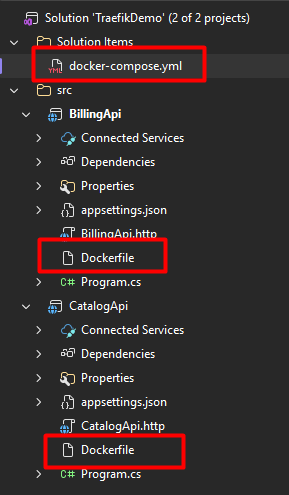
Traefik is the only container exposed to the host. All APIs are internal and reachable only through Traefik.
Traefik & Docker Compose
docker-compose.yml:
services: traefik: image: traefik:v3.6 container_name: traefik command: # Enable Docker provider - --providers.docker=true - --providers.docker.exposedbydefault=false # Entry point (HTTP) - --entrypoints.web.address=:80 # Dashboard (local dev only) - --api.dashboard=true # Useful while learning - --log.level=INFO - --accesslog=true ports: - "8080:80" volumes: # Traefik reads container labels from Docker - /var/run/docker.sock:/var/run/docker.sock:ro labels: - traefik.enable=true - traefik.http.routers.traefik.rule=Host(`traefik.localhost`) - traefik.http.routers.traefik.entrypoints=web - traefik.http.routers.traefik.service=api@internal catalog-api: build: ./CatalogApi container_name: catalog-api environment: - ASPNETCORE_URLS=http://0.0.0.0:8080 labels: - traefik.enable=true - traefik.http.routers.catalog.rule=Host(`catalog.localhost`) - traefik.http.routers.catalog.entrypoints=web - traefik.http.services.catalog.loadbalancer.server.port=8080 billing-api: build: ./BillingApi container_name: billing-api environment: - ASPNETCORE_URLS=http://0.0.0.0:8080 labels: - traefik.enable=true - traefik.http.routers.billing.rule=Host(`billing.localhost`) - traefik.http.routers.billing.entrypoints=web - traefik.http.services.billing.loadbalancer.server.port=8080
Why does this work?
- Traefik watches Docker and reads container labels
- Services declare how they are exposed
- No ports are exposed per service
- Routing is declarative and local to the service
Catalog API (.NET 10)
This API represents a typical read-only service. Program.cs
using Microsoft.AspNetCore.HttpOverrides; var builder = WebApplication.CreateBuilder(args); builder.Services.AddOpenApi(); // When running behind Traefik (reverse proxy), your app receives requests// with forwarded headers (X-Forwarded-For, X-Forwarded-Proto).// This middleware makes ASP.NET Core understand the original scheme/host.builder.Services.Configure<ForwardedHeadersOptions>(options =>{ options.ForwardedHeaders = ForwardedHeaders.XForwardedFor | ForwardedHeaders.XForwardedProto | ForwardedHeaders.XForwardedHost; // For local Docker networks, you often need to clear these defaults. // In production, you should lock it down using KnownNetworks/KnownProxies. options.KnownIPNetworks.Clear(); options.KnownProxies.Clear();}); var app = builder.Build(); app.UseForwardedHeaders(); app.MapGet("/", (HttpContext ctx) =>{ // This response is intentionally "debuggy" so you can see what Traefik changes. return Results.Ok(new { service = "Catalog API", host = ctx.Request.Host.Value, scheme = ctx.Request.Scheme, path = ctx.Request.Path.Value, remoteIp = ctx.Connection.RemoteIpAddress?.ToString() });}); app.MapGet("/health", () => Results.Ok(new { status = "ok" })); // A realistic endpoint exampleapp.MapGet("/api/products", () =>{ var products = new[] { new { id = 1, name = "Keyboard", price = 89.99 }, new { id = 2, name = "Mouse", price = 39.99 } }; return Results.Ok(products);}); if (app.Environment.IsDevelopment()){ app.MapOpenApi();} app.Run();
Why forwarded headers matter
Without UseForwardedHeaders():
- ASP .NET thinks every request is http
- Redirects break
- Auth callbacks break
- Absolute URLs are wrong This is mandatory behind any reverse proxy.
Dockerfile
FROM mcr.microsoft.com/dotnet/sdk:10.0 AS buildWORKDIR /srcCOPY . .RUN dotnet publish -c Release -o /app FROM mcr.microsoft.com/dotnet/aspnet:10.0WORKDIR /appCOPY --from=build /app .EXPOSE 8080ENTRYPOINT ["dotnet", "CatalogApi.dll"]
Billing API (.NET 10)
This API represents a write-heavy, business-oriented service. Program.cs
using Microsoft.AspNetCore.HttpOverrides; var builder = WebApplication.CreateBuilder(args); builder.Services.Configure<ForwardedHeadersOptions>(options =>{ options.ForwardedHeaders = ForwardedHeaders.XForwardedFor | ForwardedHeaders.XForwardedProto | ForwardedHeaders.XForwardedHost; options.KnownIPNetworks.Clear(); options.KnownProxies.Clear();}); builder.Services.AddOpenApi(); var app = builder.Build(); app.UseForwardedHeaders(); app.MapPost("/api/invoices/calculate", (InvoiceRequest request) =>{ var subtotal = request.Items.Sum(i => i.UnitPrice * i.Quantity); var tax = Math.Round(subtotal * request.TaxRate, 2); return Results.Ok(new { subtotal, tax, total = subtotal + tax });}); app.MapGet("/health", () => Results.Ok("OK")); if (app.Environment.IsDevelopment()){ app.MapOpenApi();} app.Run(); public record InvoiceRequest( decimal TaxRate, List<InvoiceItem> Items); public record InvoiceItem( string Name, decimal UnitPrice, int Quantity);
Dockerfile
FROM mcr.microsoft.com/dotnet/sdk:10.0 AS buildWORKDIR /srcCOPY . .RUN dotnet publish -c Release -o /app FROM mcr.microsoft.com/dotnet/aspnet:10.0WORKDIR /appCOPY --from=build /app .EXPOSE 8080ENTRYPOINT ["dotnet", "BillingApi.dll"]
Running everything:
docker compose up --build
Open:
- http://catalog.localhost:8080
- http://catalog.localhost:8080/api/products
- http://billing.localhost:8080/api/invoices/calculate
- http://traefik.localhost:8080
Why this setup is actually good
- ✅ Clean URLs
- No ports per service.
- ✅ Scales naturally
- Adding a new service = copy labels.
- ✅ Matches production architecture
- Reverse proxy first, services internal.
- ✅ No proxy config hell
- Routing lives with the service.
How to extend this setup
HTTPS - Add a websecure entrypoint + cert resolver.
Middlewares - Rate limiting, headers, auth - reusable via labels.
Observability - Metrics, access logs, tracing - without touching .NET code.
Path-based routing - Switch from subdomains to /api/* if needed.
Wrapping up
Traefik is more than just a reverse proxy - it’s what makes Docker + .NET feel clean and predictable.
Instead of fighting ports and proxy configs, you get:
- clear routing rules
- production-like local environments
services that stay focused on business logic Once this setup is in place, adding new services becomes trivial, local development becomes boring (in a good way), and your architecture starts scaling naturally.
If you’re already running .NET in Docker, Traefik is the missing piece that makes everything click.
That's all for today!
Happy shipping 🚢