A quick word from me
This issue isn't sponsored - I write these deep dives in my free time and keep them free for everyone. If your company sells AI tools, dev tools, courses, or services that .NET developers would actually use, sponsoring an issue is the most direct way to reach them.
Want to reach thousands of .NET developers? Sponsor TheCodeMan →🚀 Coming Soon: Enforcing Code Style
A brand-new course is launching soon inside The CodeMan Community!
Join now to lock in early access when it drops - plus get everything else already inside the group.
Founding Member Offer:
- First 100 members get in for just $4/month - 80 spots already taken!
Or subscribe for 3 months ($12) or annually ($40) to unlock full access when the course goes live.
Get ahead of the game - and make clean, consistent code your superpower. Join here
Background
Alright, let’s talk invoices.
As someone who runs a developer brand, I often work with sponsors who want visibility across my newsletter, LinkedIn, and YouTube content.
After we agree on a campaign - I need to send them a clean, professional-looking PDF invoice.
Sure, I could use Word or some billing software... but I wanted more control. I wanted automation.
I wanted to plug this into my app, generate it with code, and style it with my own HTML/CSS.
That’s where IronPDF came in - and honestly, it made the whole thing feel effortless.
What is IronPDF?
IronPDF is a powerful .NET library that lets you generate PDFs from HTML, Razor views, or full URLs - using a real Chromium rendering engine.
Here’s what makes it different:
- You write HTML/CSS like normal - no need to learn a PDF-specific syntax
- It runs locally (no browser required)
- Outputs exactly what you'd see in Chrome
- Works in airgapped and secure environments (banks love it)
- Friendly API with minimal boilerplate If you’ve ever fought with low-fidelity PDF libraries that mess up your styles - IronPDF feels like a breath of fresh air.
HTML to PDF Conversion With IronPDF
The first thing we are going to do is to add nuget package:
Install-Package IronPdf
Let’s define a C# class to represent an invoice:
public class Invoice{ public string InvoiceNumber { get; set; } public string CompanyName { get; set; } public string ClientName { get; set; } public DateTime Date { get; set; } = DateTime.UtcNow; public List<(string Description, decimal Amount)> Items { get; set; } public decimal Total => Items.Sum(x => x.Amount);}
This lets me dynamically create invoices for any client, with any line items (e.g. LinkedIn post, Newsletter ad).
The HTML Template
I created a basic HTML template and saved it in localhost as invoice.html file. You can use Razor view here, or even webpage from the url.
<!DOCTYPE html><html><head> <style> body { font-family: Arial; padding: 30px; } h1 { color: #444; } table { width: 100%; border-collapse: collapse; margin-top: 20px; } th, td { border: 1px solid #ccc; padding: 10px; text-align: left; } .total { text-align: right; font-weight: bold; } </style></head><body> <h1>Invoice - </h1> <p><strong>Company:</strong> </p> <p><strong>Client:</strong> </p> <p><strong>Date:</strong> </p> <table> <thead><tr><th>Description</th><th>Amount</th></tr></thead> <tbody> </tbody> </table> <p class="total">Total: $</p></body></html>
Here is the quick view on html page that's created with placeholders.
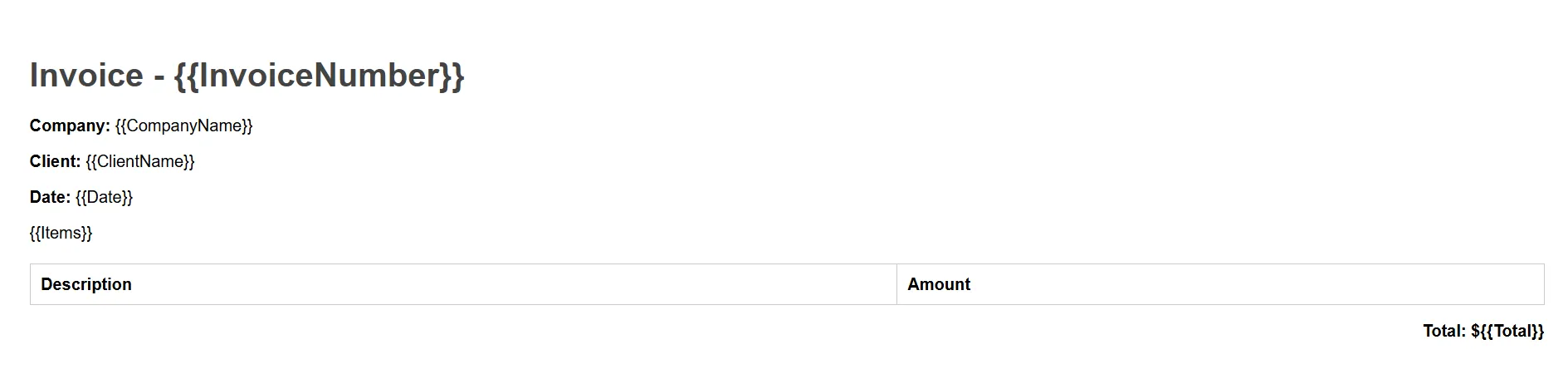
Now in the code, I'm using the real data (already prepared from another API call) and I'm populating placeholders.
var invoice = new Invoice{ InvoiceNumber = "INV-2024-003", CompanyName = "TheCodeMan", ClientName = "FinTech Innovations Ltd", Items = new() { ("Newsletter Sponsorship", 500), ("LinkedIn Post", 300), ("Twitter Mention", 200) }}; // Load HTML templatestring htmlTemplate = File.ReadAllText("invoice.html"); // Convert line items to table rowsstring itemsHtml = string.Join("", invoice.Items.Select(i => $"<tr><td>{i.Description}</td><td>${i.Amount}</td></tr>")); // Replace placeholders with real datastring filledHtml = htmlTemplate .Replace("", invoice.InvoiceNumber) .Replace("", invoice.CompanyName) .Replace("", invoice.ClientName) .Replace("", invoice.Date.ToShortDateString()) .Replace("", itemsHtml) .Replace("", invoice.Total.ToString());
Finally I use IronPDF ChromePdfRenderer to convert the HTML to a PDF document.
// Render to PDFvar renderer = new ChromePdfRenderer();var pdf = renderer.RenderHtmlAsPdf(filledHtml);pdf.SaveAs("Invoice-FinTech.pdf"); Console.WriteLine("Invoice PDF generated!");
And that's all. So simple. Here is the Pdf file as result:
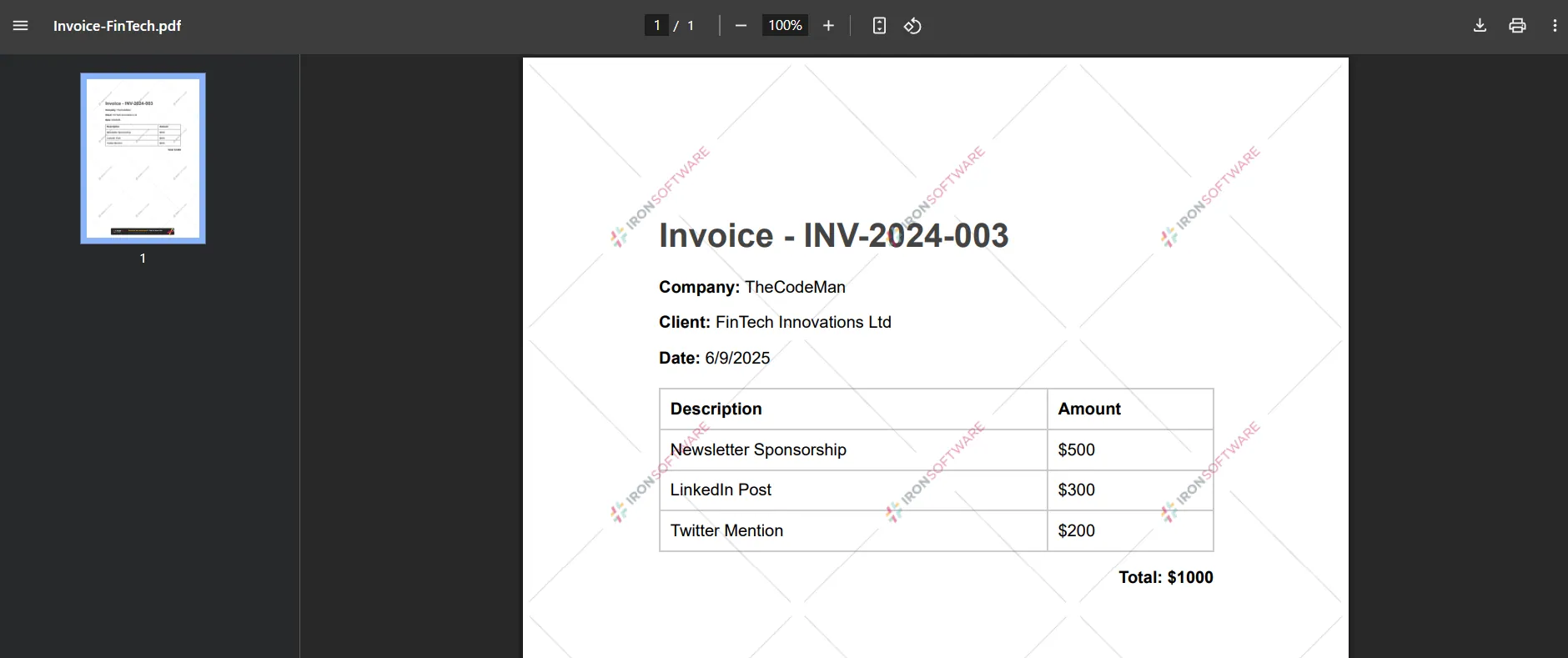
Licensing
IronPDF is free for development use and has multiple pricing tiers for commercial use that you can check out here.
And now, I use Automation tool to send the email with this attachment.
Bonus: Digitally Sign the Invoice
Let’s load the CSV and convert it to a list of products.
var renderer = new ChromePdfRenderer();var pdf = renderer.RenderHtmlAsPdf(filledHtml); var signature = new PdfSignature("certificate.pfx", "password"){ ContactInformation = "stefan@thecodeman.net", SigningReason = "Sponsorship Invoice", SigningLocation = "Nis, Serbia"}; pdf.Sign(signature); pdf.SaveAs("Invoice-FinTech.pdf");
Some Advanced Things
There are also a few nice advanced tricks I’ve picked up.
For instance, you can easily add your logo to the invoice by just embedding an < img src="logo.png" /> tag right in the HTML - that way, your brand is front and center.
If you’re using Razor Views in an ASP .NET app, you can even render the invoice directly from your existing view templates using RenderRazorViewToPdf().
And if you prefer, you can skip the HTML string entirely and just point IronPDF to a live URL (like https://yourapp/invoice/123) using RenderUrlAsPdf().
Need headers or footers with page numbers, disclaimers, or payment terms?
Just set renderer.PrintOptions.Header and .Footer to any HTML fragment you like.
You can also bring in your own CSS files or bundle styles right into the document - making it easy to keep invoices visually consistent with your brand.
How to merge 2 PDF files?
Another handy feature I use is PDF merging.
Sometimes I want to include an additional document with the invoice - like a sponsorship agreement, campaign summary, or contract.
With IronPDF, it’s super easy to combine two (or more) PDFs into one.
You just load both files using PdfDocument.FromFile(...) and merge them with PdfDocument.Merge(...). Then you save it as a single, polished PDF.
This is especially useful when you're sending an invoice along with official paperwork - the client gets everything bundled neatly in one file, and you don’t need to mess with external tools or manual merging.
public void MergePdfs(){ var pdf1 = PdfDocument.FromFile("doc1.pdf"); var pdf2 = PdfDocument.FromFile("doc2.pdf"); var merged = PdfDocument.Merge(pdf1, pdf2); merged.SaveAs("merged.pdf");}
Wrapping Up
And that’s how I generate branded, professional invoices using IronPDF - all in C# and just a few lines of code.
Whether you're a solo dev sending invoices to clients, or you're working in a high-security environment like a bank or fintech company, IronPDF gives you the perfect mix of power, flexibility, and simplicity.
You write HTML like you normally would, and IronPDF handles the rest - from styling and logos to digital signatures and PDF merging.
It’s not just a tool I tested - it’s something I actually use every time I need to bill a sponsor.
And once you set it up, it feels like magic. One click, and a beautifully rendered invoice is ready to send.
If you want a starter project, a sample template, or have any questions, feel free to reach out. Happy to share what’s working for me!
Be sure to check it out here.
That's all from me today.
P.S. Follow me on YouTube.