A word from this week's sponsor
A couple of weeks ago JetBrains flew me to Amsterdam to see the launch of JetBrains Air - their new open system for agentic development, built around the IDE, not away from it. The part that stuck with me as a .NET dev: it doesn't force you onto one agent or tool, and it keeps context and governance coherent across you, your team, and your org. If you live in Rider or ReSharper, it's worth 5 minutes.
Read the announcement →Want to reach thousands of .NET developers like this?
Sponsor TheCodeMan →Keywords: Postgres row-level security EF Core, multi-tenant EF Core, tenant isolation PostgreSQL, row level security .NET, EF Core global query filters, named query filters EF Core 10, DbConnectionInterceptor, setconfig currentsetting, FORCE ROW LEVEL SECURITY, Npgsql connection pooling
The Problem: Tenant Isolation Lives in One Line of C#
In a shared-database multi-tenant app, every tenant's rows sit in the same tables, separated by a TenantId column. The usual way to keep tenants apart in EF Core is a global query filter:
modelBuilder.Entity<Order>() .HasQueryFilter(o => o.TenantId == TenantId);
That works, and it's a good default. But it means tenant isolation is enforced in exactly one place: EF Core's LINQ pipeline. Anything that doesn't go through that pipeline doesn't get the filter.
That includes more code than you'd expect:
- A query with
.IgnoreQueryFilters()- usually added to see soft-deleted rows, which also removes the tenant filter. ExecuteSqlRaw/ExecuteSqlAsyncfor a bulk fix or a data migration.- A Dapper query in a reporting endpoint, or a background job using plain ADO.NET.
- A new entity someone added last month without the filter.
In each of those cases the database happily returns every tenant's rows, because as far as Postgres knows, there is nothing wrong with that query.
Postgres row-level security (RLS) moves the rule into the database. You attach a policy to the table that says "only rows where TenantId matches the current tenant," and Postgres applies it to every query against that table, whoever wrote it and whatever library sent it. This post shows how to set that up with EF Core: the policy, how to pass the current tenant from .NET to Postgres, and the three traps that make RLS silently do nothing.
Here's the short version. Postgres row-level security (RLS) lets the database filter rows per tenant on every query. With EF Core, you create the policy in a migration, set the current tenant on each connection with a DbConnectionInterceptor that calls set_config, and connect as a role that can't bypass RLS. The policy then applies to EF Core, raw SQL, and Dapper alike.
How Postgres Row-Level Security Works
RLS is a table-level switch plus one or more policies:
ALTER TABLE "Orders" ENABLE ROW LEVEL SECURITY; CREATE POLICY tenant_isolation ON "Orders" USING ("TenantId" = NULLIF(current_setting('app.tenant_id', true), '')::uuid);
Once RLS is enabled, Postgres adds the policy's USING expression to every SELECT, UPDATE and DELETE against the table. A policy defined without a command (like this one) applies to all commands, and when there's no separate WITH CHECK clause, the USING expression is also used to check new rows. So an INSERT of a row with another tenant's ID fails with new row violates row-level security policy for table "Orders".
If RLS is enabled but no policy exists, Postgres uses default-deny: no rows are visible at all.
The policy needs to know who the current tenant is. Postgres has no idea what a tenant is, so we pass it in as a custom setting. set_config('app.tenant_id', '...', false) sets a value for the current session, and current_setting('app.tenant_id', true) reads it back inside the policy. The true there is missing_ok: if the setting was never set, it returns NULL instead of throwing.
The NULLIF(..., '') matters - the traps section below explains why.
Adding the Policy in an EF Core Migration
EF Core doesn't model policies, so they go into a migration as raw SQL. Generate an empty migration (dotnet ef migrations add AddTenantRls) and fill it in:
public partial class AddTenantRls : Migration{ protected override void Up(MigrationBuilder migrationBuilder) { migrationBuilder.Sql(""" ALTER TABLE "Orders" ENABLE ROW LEVEL SECURITY; ALTER TABLE "Orders" FORCE ROW LEVEL SECURITY; CREATE POLICY tenant_isolation ON "Orders" USING ("TenantId" = NULLIF(current_setting('app.tenant_id', true), '')::uuid); """); } protected override void Down(MigrationBuilder migrationBuilder) { migrationBuilder.Sql(""" DROP POLICY IF EXISTS tenant_isolation ON "Orders"; ALTER TABLE "Orders" NO FORCE ROW LEVEL SECURITY; ALTER TABLE "Orders" DISABLE ROW LEVEL SECURITY; """); }}
The quoted "Orders" and "TenantId" match EF Core's default naming with Npgsql. If you use a snakecase naming convention, use orders and `tenantid` instead. Repeat the block for every tenant-owned table.
Make sure there's an index that starts with TenantId on each of these tables. The policy adds a TenantId = ... predicate to every query, and without an index that becomes a scan. current_setting is a stable function, so Postgres evaluates it once per query rather than once per row.
Passing the Tenant from .NET to Postgres
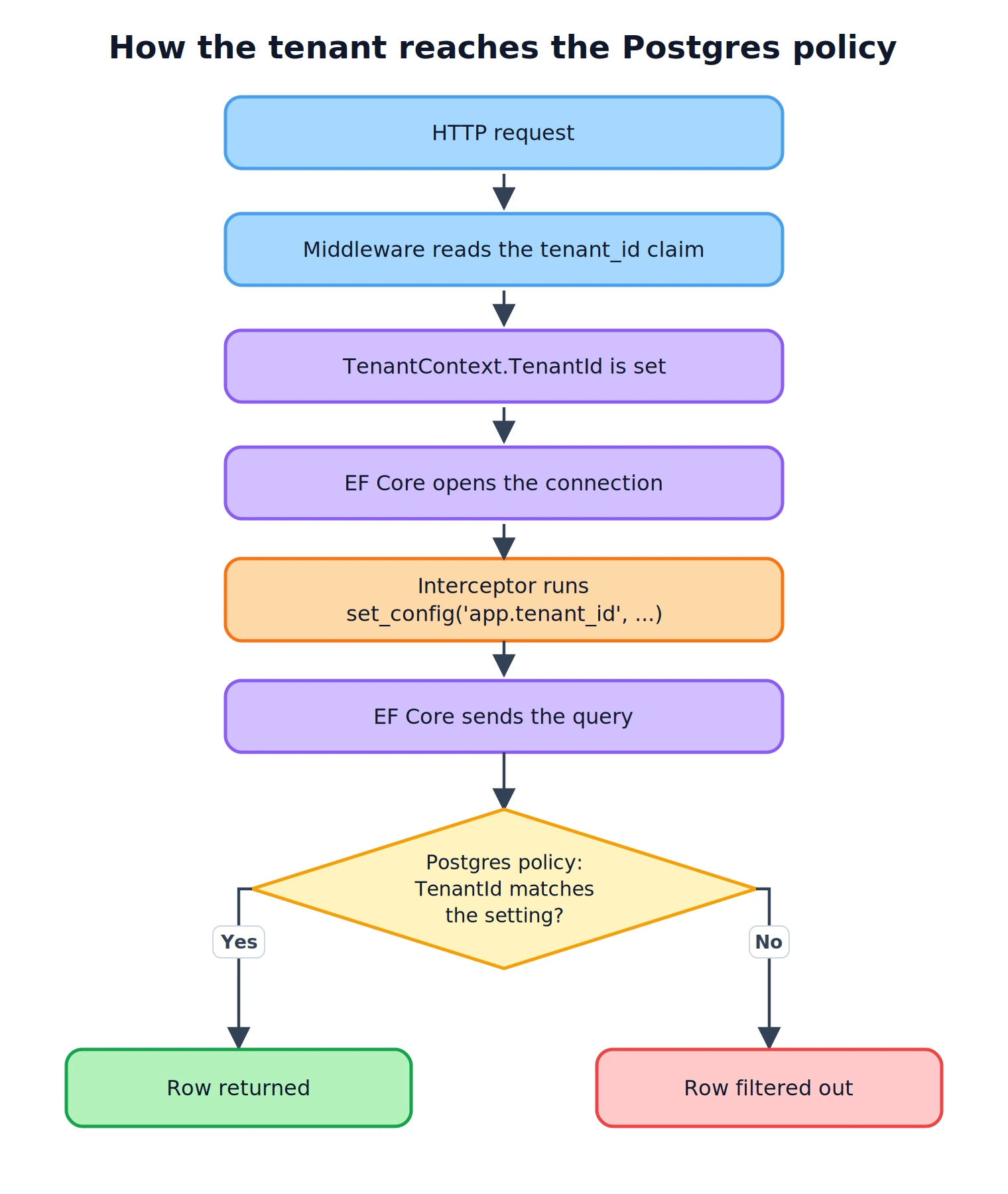
The tenant usually comes from the authenticated user, for example a tenant_id claim. First, a scoped holder for it:
public sealed class TenantContext{ public Guid? TenantId { get; set; }}
A small middleware fills it in after authentication:
builder.Services.AddScoped<TenantContext>(); // ... app.UseAuthentication(); app.Use(async (context, next) =>{ var tenant = context.RequestServices.GetRequiredService<TenantContext>(); if (Guid.TryParse(context.User.FindFirst("tenant_id")?.Value, out var tenantId)) { tenant.TenantId = tenantId; } await next();}); app.UseAuthorization();
Now the important part: getting that value onto the database connection. EF Core opens a connection for each query (and closes it right after) unless you open it yourself, so the right hook is "every time a connection is opened." That's DbConnectionInterceptor.ConnectionOpened. (If interceptors are new to you, I covered the different types in EF Core Interceptors in .NET.)
public sealed class TenantConnectionInterceptor(TenantContext tenant) : DbConnectionInterceptor{ private const string Sql = "SELECT set_config('app.tenant_id', @tenant, false)"; public override void ConnectionOpened( DbConnection connection, ConnectionEndEventData eventData) { using var command = CreateCommand(connection); command.ExecuteNonQuery(); } public override async Task ConnectionOpenedAsync( DbConnection connection, ConnectionEndEventData eventData, CancellationToken cancellationToken = default) { await using var command = CreateCommand(connection); await command.ExecuteNonQueryAsync(cancellationToken); } private DbCommand CreateCommand(DbConnection connection) { var command = connection.CreateCommand(); command.CommandText = Sql; var parameter = command.CreateParameter(); parameter.ParameterName = "tenant"; parameter.Value = tenant.TenantId?.ToString() ?? string.Empty; command.Parameters.Add(parameter); return command; }}
Both overrides are needed. Sync EF calls (ToList, SaveChanges) go through ConnectionOpened, async ones through ConnectionOpenedAsync. Override only one and half your queries run without a tenant.
When there is no tenant (an anonymous request, a background job that forgot to set one), the interceptor sets an empty string. The policy turns that into NULL, "TenantId" = NULL is never true, and the query returns zero rows. That's the behavior you want: missing tenant context fails closed, not open.
Register the interceptor as scoped and attach it when the DbContext is built:
builder.Services.AddScoped<TenantConnectionInterceptor>(); builder.Services.AddDbContext<AppDbContext>((sp, options) => options .UseNpgsql(builder.Configuration.GetConnectionString("App")) .AddInterceptors(sp.GetRequiredService<TenantConnectionInterceptor>()));
This depends on the interceptor being resolved per request, which means it doesn't work with AddDbContextPool: pooled contexts build their options once and reuse them, so every context would carry the first request's interceptor. Use plain AddDbContext here. (More on why in Managing EF Core DbContext Lifetime.)
Here's the whole path for one query:
Keep the Query Filter Anyway
RLS doesn't replace the EF Core query filter. Keep both. The filter gives EF the tenant predicate directly, it keeps your queries correct in tests that don't run against Postgres, and it documents intent in the model. RLS is the enforcement that still holds when the filter doesn't apply.
EF Core 10 adds named query filters, which fix the most common way the filter gets lost. Before EF Core 10, an entity had one filter, so tenant and soft-delete conditions were combined into one expression, and IgnoreQueryFilters() dropped both. Now each filter has a name and you can turn off only the one you mean:
public sealed class AppDbContext( DbContextOptions<AppDbContext> options, TenantContext tenant) : DbContext(options){ private Guid? TenantId => tenant.TenantId; public DbSet<Order> Orders => Set<Order>(); protected override void OnModelCreating(ModelBuilder modelBuilder) { modelBuilder.Entity<Order>() .HasQueryFilter("Tenant", o => o.TenantId == TenantId) .HasQueryFilter("SoftDelete", o => !o.IsDeleted); }}
// Show deleted orders for the current tenant onlyvar deleted = await db.Orders .IgnoreQueryFilters(["SoftDelete"]) .Where(o => o.IsDeleted) .ToListAsync(ct);
EF Core evaluates TenantId per DbContext instance, so each request gets its own value. With named filters the tenant condition stays in place, and with RLS underneath, even a plain IgnoreQueryFilters() can't read another tenant's rows.
Trap 1: The Role That Ignores Every Policy
This is the one that makes RLS do nothing while everything looks correct. From the Postgres documentation: superusers and roles with the BYPASSRLS attribute always bypass row security, and table owners bypass it too, unless the table has FORCE ROW LEVEL SECURITY.
In many .NET projects the app connects with the same user that ran dotnet ef database update. That user created the tables, so it owns them. In local Docker setups it's often the postgres superuser. Either way, the policies exist and filter nothing.
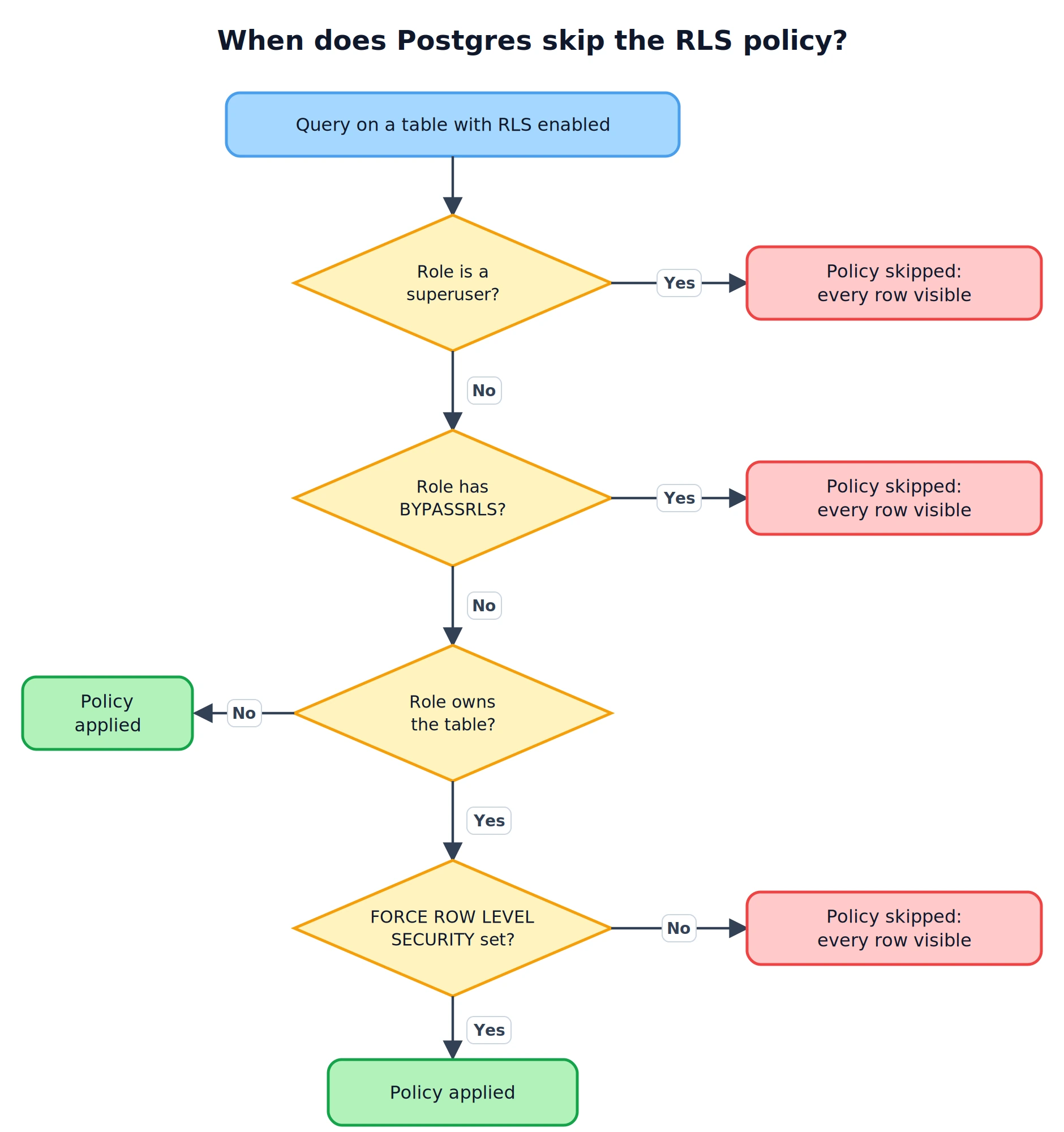
The fix is two separate roles. Migrations run as the owner. The application connects as a role that owns nothing and can't bypass RLS:
CREATE ROLE app_user LOGIN PASSWORD '...' NOSUPERUSER NOBYPASSRLS; GRANT USAGE ON SCHEMA public TO app_user;GRANT SELECT, INSERT, UPDATE, DELETE ON ALL TABLES IN SCHEMA public TO app_user;GRANT USAGE, SELECT ON ALL SEQUENCES IN SCHEMA public TO app_user; -- Tables created by future migrations get the same grantsALTER DEFAULT PRIVILEGES FOR ROLE migrator IN SCHEMA public GRANT SELECT, INSERT, UPDATE, DELETE ON TABLES TO app_user;ALTER DEFAULT PRIVILEGES FOR ROLE migrator IN SCHEMA public GRANT USAGE, SELECT ON SEQUENCES TO app_user;
Here migrator is the role your migrations run as. The FORCE ROW LEVEL SECURITY in the migration above is the second layer: if someone points the app at the owner's connection string by mistake, the policy still applies.
Because this failure is silent, I'd rather have the app refuse to start than find out later. A check at startup is a few lines:
await using (var scope = app.Services.CreateAsyncScope()){ var db = scope.ServiceProvider.GetRequiredService<AppDbContext>(); var bypasses = await db.Database .SqlQuery<bool>($""" SELECT rolsuper OR rolbypassrls AS "Value" FROM pg_roles WHERE rolname = current_user """) .SingleAsync(); var unprotected = await db.Database .SqlQuery<string>($""" SELECT relname AS "Value" FROM pg_class WHERE relname IN ('Orders', 'Invoices') AND relnamespace = 'public'::regnamespace AND NOT (relrowsecurity AND relforcerowsecurity) """) .ToListAsync(); if (bypasses || unprotected.Count > 0) { throw new InvalidOperationException( $"Row-level security is not enforced. Bypassing role: {bypasses}. " + $"Unprotected tables: {string.Join(", ", unprotected)}"); }}
Replace the table list with your tenant-owned tables. If a later migration adds a table and forgets the policy, you find out on the next deploy, not from a customer.
Trap 2: The Empty String That Isn't NULL
Why the NULLIF in the policy? Because current_setting('app.tenant_id', true) only returns NULL if the setting has never been set on that connection. Once it has been set, even if it's later reset, Postgres keeps it defined with an empty string as its value. This is a known Postgres behavior for custom settings.
Pooled connections get reset between uses, so a reused connection that gets no tenant will return ''. Without NULLIF, the policy evaluates ''::uuid, and the query fails with invalid input syntax for type uuid: "". With NULLIF, it becomes NULL and the query returns zero rows. The interceptor setting string.Empty when there's no tenant relies on the same conversion.
Trap 3: Connection Pooling and Leftover Tenants
set_config(..., false) sets the value for the whole session, which in practice means for the physical connection. Connections are pooled, so the next request that picks up this connection starts with whatever tenant was set last.
With EF Core that's fine, because the interceptor sets the tenant again every time the connection is opened. Code that doesn't go through the interceptor is the risk: a Dapper query that uses the same connection string shares the same Npgsql pool, and it runs with no set_config call of its own.
What protects you there is Npgsql's reset. By default, when a pooled connection is reused, Npgsql sends DISCARD ALL first (documented here), which resets session settings. The Dapper query sees an empty tenant and gets zero rows, not the previous request's data.
Npgsql lets you turn that reset off with No Reset On Close=true in the connection string, and the performance docs mention it as an option for short-lived connections. With session-level tenant settings, don't. The reset is part of your isolation. There's a public example of a team weighing exactly this: the Nocturne project found that set_config and DISCARD ALL made up a large share of the statements on their Postgres, and still rejected No Reset On Close because their tenant settings depend on the reset. They went after the number of connections opened instead.
That issue also shows the real cost of this design: every connection open is one extra round trip for set_config. For most apps that's small, but if a request opens dozens of short connections, it adds up.
If you run PgBouncer in transaction pooling mode, session-level settings don't work reliably at all, because consecutive statements from your app can run on different server connections. There the tenant has to be set with set_config('app.tenant_id', @tenant, true) (transaction-local) inside an explicit transaction that wraps the queries, for example from a DbTransactionInterceptor, and every query has to run inside that transaction.
Checking It Works
Before trusting the policies, check them by hand in psql. Connect as the migration owner (or any role that is a member of app_user), switch to the app role, and query as two different tenants:
SET ROLE app_user; -- Tenant A: only tenant A's ordersSELECT set_config('app.tenant_id', '6f1c2a3e-0000-0000-0000-00000000000a', false);SELECT count(*) FROM "Orders"; -- No tenant: zero rows, no errorSELECT set_config('app.tenant_id', '', false);SELECT count(*) FROM "Orders"; -- Writing another tenant's row: rejected by the policySELECT set_config('app.tenant_id', '6f1c2a3e-0000-0000-0000-00000000000a', false);INSERT INTO "Orders" ("Id", "TenantId", "IsDeleted")VALUES (gen_random_uuid(), '6f1c2a3e-0000-0000-0000-00000000000b', false); RESET ROLE;
The first count should match tenant A's rows, the second should be 0, and the insert should fail with new row violates row-level security policy for table "Orders". Use your own tenant IDs and the columns your Orders table actually requires. If the first query returns every row, go back to Trap 1: the role you're testing with bypasses RLS.
What RLS Doesn't Do
RLS filters rows. It doesn't know who the user is, only the setting you give it, so if your middleware reads the tenant from a value the user controls, RLS will enforce the wrong tenant correctly. The tenant has to come from something you trust, like a validated token claim.
It also doesn't help admin or cross-tenant features. Those need their own path: a separate role with BYPASSRLS used only by that code, or an explicit policy for it. Keep that path narrow and separate from the normal app connection.
FAQ
What is row-level security in PostgreSQL?
Row-level security (RLS) is a PostgreSQL feature that filters which rows a query can see or modify, based on policies attached to the table. Once RLS is enabled on a table, Postgres adds the policy's condition to every SELECT, UPDATE, DELETE and INSERT against it, no matter which application or library sent the query.
Does Postgres row-level security work with EF Core?
Yes. EF Core doesn't know about the policies, and it doesn't need to. You create them in a migration with migrationBuilder.Sql, set the current tenant on each connection with a DbConnectionInterceptor that calls set_config, and Postgres applies the policy to every query EF Core sends.
Should I use RLS instead of EF Core global query filters?
Use both. The global query filter keeps queries tenant-scoped inside EF Core and makes intent visible in the model. RLS enforces the same rule in the database, so it still holds for IgnoreQueryFilters(), raw SQL, Dapper, and tables someone forgot to filter.
Why does my RLS policy return all rows?
Almost always because the role your app connects with bypasses RLS: it's a superuser, it has BYPASSRLS, or it owns the table and the table doesn't have FORCE ROW LEVEL SECURITY. Connect as a separate role that owns nothing, and add FORCE ROW LEVEL SECURITY to each table.
Is it safe to use set_config with connection pooling?
With Npgsql's default settings, yes, because Npgsql runs DISCARD ALL when a pooled connection is reused. Don't set No Reset On Close=true, and wrap current_setting in NULLIF(..., '') so a reset connection returns zero rows instead of an error. With PgBouncer in transaction mode, use transaction-local settings instead.
Wrapping Up
A global query filter keeps tenants apart only for code that goes through EF Core's LINQ pipeline. Postgres row-level security enforces the same rule on every query, which covers the raw SQL, the Dapper call, and the forgotten filter.
The setup is a policy per table in a migration, a middleware that reads the tenant, and a connection interceptor that passes it to Postgres with set_config. The parts that decide whether it actually works are the traps: connect as a role that can't bypass RLS and add FORCE ROW LEVEL SECURITY, wrap current_setting in NULLIF, and leave Npgsql's connection reset on. Add the startup check so a missing policy stops a deploy instead of reaching production.