Stefan Đokić
A word from this week's sponsor
Search gets messy when users stop typing exact keywords. They misspell words, write vague phrases, and search by intent: "Show me a Honda or BMW with at least 200hp, rear-wheel drive, under $50K."
is an open-source search engine for fast, typo-tolerant app and site search. With Natural Language Search, users can search in plain English while Typesense handles the structured query behind the scenes. If your current database search feels clunky, Typesense is worth checking out.
Want to reach thousands of .NET developers like this?
Sponsor TheCodeMan →Keywords: rate limiting ASP.NET Core, built-in RateLimiter, AddRateLimiter, UseRateLimiter, fixed window limiter, sliding window limiter, token bucket limiter, concurrency limiter, PartitionedRateLimiter, 429 Too Many Requests, Retry-After header, per-user rate limiting, ASP.NET Core rate limiter middleware
The Endpoint That Fell Over on a Monday
One client had a login endpoint that worked fine for two years. Then a credential-stuffing script found it over a weekend and hammered it with thousands of requests a second. The endpoint didn't crash in an interesting way - it just dragged the whole database down with it, and every other feature in the app slowed to a crawl because they shared the same connection pool. (That shared-resource failure is the same class of problem I broke down in what breaks first at 10k concurrent connections.)
The fix wasn't more servers. It was a limit. That endpoint had no business accepting more than a handful of requests per minute from a single IP, and nothing was enforcing it. The fix was rate limiting, and in ASP.NET Core you no longer need a library for it.
Rate limiting in ASP.NET Core is built into the framework since .NET 7. The RateLimiter middleware in Microsoft.AspNetCore.RateLimiting caps how often a caller can hit your API using four algorithms - fixed window, sliding window, token bucket, and concurrency - so you no longer reach for a package like AspNetCoreRateLimit. Here's how I actually wire it up.
The Four Rate Limiters in ASP.NET Core, and When Each Fits
The built-in middleware gives you four algorithms. They're not interchangeable - each one shapes traffic differently, and picking the wrong one is how you end up either too loose or accidentally hostile to legitimate users.
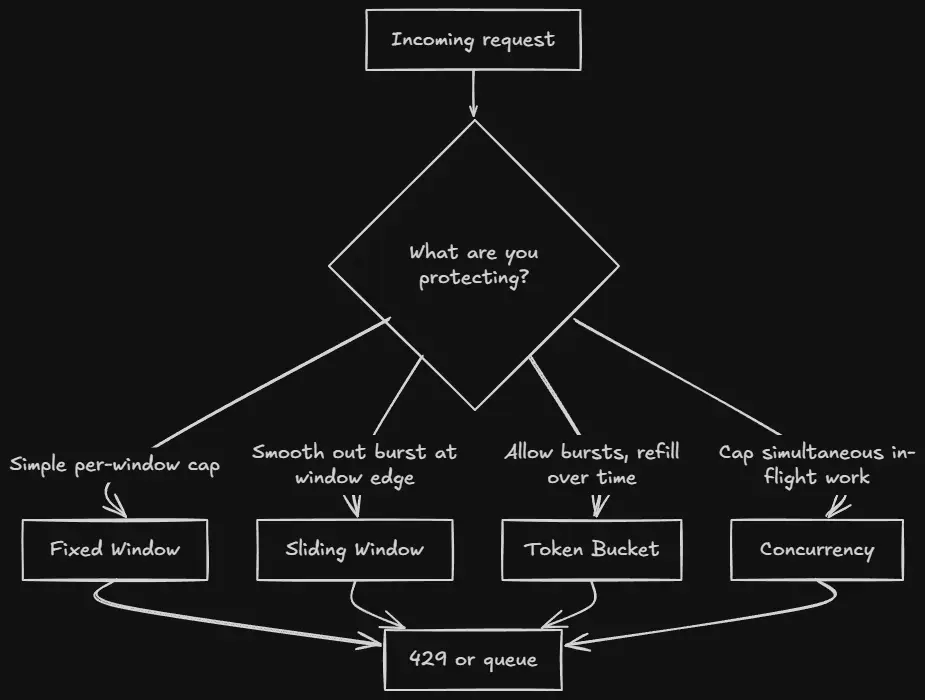
Fixed window counts requests in a fixed slice of time - 100 per minute, reset at the top of each minute. Simple, but it has a known weakness: a caller can send 100 at 11:59:59 and another 100 at 12:00:00 and slip 200 through in barely over a second.
Sliding window fixes that by splitting the window into segments and rolling them forward, so the edge-of-window burst gets counted against the recent past. Slightly more overhead, much fairer.
Token bucket models a bucket that refills at a steady rate. Each request takes a token; when the bucket's empty you're limited. It's the one to reach for when you want to allow bursts - a user can spend the whole bucket at once, then wait for it to refill.
Concurrency doesn't count over time at all. It caps how many requests run at the same time. Perfect for an expensive endpoint - a report generator, a file export - where the problem isn't the rate, it's ten of them running at once.
The Smallest Thing That Works
Two calls: register the service, add the middleware. Here's a fixed-window limiter that applies to everything:
using System.Threading.RateLimiting; var builder = WebApplication.CreateBuilder(args); builder.Services.AddRateLimiter(options =>{ options.AddFixedWindowLimiter("fixed", limiter => { limiter.PermitLimit = 100; // 100 requests... limiter.Window = TimeSpan.FromMinutes(1); // ...per minute limiter.QueueProcessingOrder = QueueProcessingOrder.OldestFirst; limiter.QueueLimit = 0; // reject immediately, don't queue });}); var app = builder.Build(); app.UseRateLimiter(); // order matters - see below app.MapGet("/reports", () => Results.Ok("here's your data")) .RequireRateLimiting("fixed"); app.Run();
RequireRateLimiting("fixed") attaches the named policy to that endpoint. Nothing is limited until you opt an endpoint in - the middleware being present doesn't limit anything on its own.
One thing that bites people: UseRateLimiter has to come after routing but you want it early enough to actually protect the work behind it. In minimal APIs the routing is implicit, so placing it right after var app = builder.Build() is fine. If you have UseAuthentication/UseAuthorization, decide deliberately whether you want to limit before or after auth - limiting before auth protects the auth system itself from being hammered, which is usually what you want for a login endpoint.
Swapping the algorithm is a one-line change. Here's the same cap as a sliding window, which splits the minute into segments that roll forward so nobody can double up at the boundary:
builder.Services.AddRateLimiter(options =>{ options.AddSlidingWindowLimiter("sliding", limiter => { limiter.PermitLimit = 100; // 100 requests... limiter.Window = TimeSpan.FromMinutes(1); // ...per minute... limiter.SegmentsPerWindow = 6; // ...counted over 6 rolling 10s segments limiter.QueueLimit = 0; });});
The Part That Actually Matters: Partitioning
A single global limiter is almost never what you want. "100 requests per minute across all users combined" means one noisy client can eat the entire budget and starve everyone else. You want the limit applied per user, or per IP, or per API key. That's what partitioning does - it gives each caller their own bucket.
Here's a global limiter partitioned by authenticated user, falling back to IP for anonymous callers:
builder.Services.AddRateLimiter(options =>{ options.GlobalLimiter = PartitionedRateLimiter.Create<HttpContext, string>(context => { // One partition per user (or per IP if not signed in). // Each partition gets its OWN 100-per-minute budget. var partitionKey = context.User.Identity?.Name ?? context.Connection.RemoteIpAddress?.ToString() ?? "anonymous"; return RateLimitPartition.GetFixedWindowLimiter(partitionKey, _ => new FixedWindowRateLimiterOptions { PermitLimit = 100, Window = TimeSpan.FromMinutes(1), QueueLimit = 0 }); }); options.RejectionStatusCode = StatusCodes.Status429TooManyRequests;});
GlobalLimiter runs on every request, no RequireRateLimiting needed. The partition key is the whole game: pick something that identifies the caller you want to throttle. User name for signed-in traffic, IP for anonymous, API key for a public API. Get this wrong - say you partition by something every request shares - and you're back to a single global bucket.
Note RejectionStatusCode. The default rejection status is 503, which is misleading - a rate-limited request isn't a server error, it's the client asking too often. Set it to 429 Too Many Requests so clients (and your monitoring) read it correctly.
Two things to get right in that partition key. First, RemoteIpAddress behind a reverse proxy or CDN (Netlify, Cloudflare, nginx) is the proxy's IP, not the client's - so every anonymous caller lands in one partition and your per-IP limit silently goes global. Add UseForwardedHeaders and trust your proxy so RemoteIpAddress reflects the real client from X-Forwarded-For. Second, User.Identity?.Name is only populated after authentication runs, so a per-user partition needs UseRateLimiter after UseAuthentication - the opposite of the login endpoint above, where you limit before auth. Pick the order per endpoint, or run two policies.
Giving the Client a Real 429
A bare 429 with an empty body is rude. A good one tells the caller how long to wait. The token bucket and window limiters expose the retry delay through metadata, and you hook it with OnRejected:
builder.Services.AddRateLimiter(options =>{ options.RejectionStatusCode = StatusCodes.Status429TooManyRequests; options.OnRejected = async (context, cancellationToken) => { // If the limiter knows when a permit frees up, tell the client. if (context.Lease.TryGetMetadata(MetadataName.RetryAfter, out var retryAfter)) { context.HttpContext.Response.Headers.RetryAfter = ((int)retryAfter.TotalSeconds).ToString(); } context.HttpContext.Response.ContentType = "application/json"; await context.HttpContext.Response.WriteAsJsonAsync(new { error = "Too many requests. Slow down and try again shortly." }, cancellationToken); }; options.AddTokenBucketLimiter("api", limiter => { limiter.TokenLimit = 50; // bucket holds 50 limiter.TokensPerPeriod = 10; // refill 10... limiter.ReplenishmentPeriod = TimeSpan.FromSeconds(10); // ...every 10s limiter.QueueLimit = 0; limiter.AutoReplenishment = true; });});
The Retry-After header is the difference between a client that backs off gracefully and one that keeps retrying into the wall. Any HTTP client library worth using will respect it - and if you're on the calling side, honoring it pairs naturally with Polly v8 retry policies.
Queueing vs Rejecting
Every limiter has a QueueLimit. Set it to 0 and excess requests are rejected immediately - the right default for public HTTP endpoints, because a caller waiting in a queue is a caller holding a connection open. Set it above zero and excess requests wait for a permit instead of being rejected, in the order set by QueueProcessingOrder.
Queueing makes sense for the concurrency limiter guarding expensive work - you'd rather make request eleven wait a moment than reject it outright:
options.AddConcurrencyLimiter("expensive-export", limiter =>{ limiter.PermitLimit = 5; // at most 5 exports running at once limiter.QueueLimit = 20; // up to 20 more may wait their turn limiter.QueueProcessingOrder = QueueProcessingOrder.OldestFirst;});
For a login endpoint, though, you want QueueLimit = 0. Queueing a credential-stuffing attack just means holding thousands of connections open while they wait to be let through - you've turned a rate-limit into a slow resource leak.
Applying Policies to Endpoints
You can attach policies with the fluent API or with attributes. Both policies below ("api" and "login-strict") are registered in AddRateLimiter exactly like the ones above - here you're just attaching them. On minimal API groups the fluent form reads well:
var api = app.MapGroup("/api").RequireRateLimiting("api"); api.MapGet("/products", GetProducts); // inherits "api"api.MapPost("/orders", CreateOrder); // inherits "api" app.MapPost("/auth/login", Login) .RequireRateLimiting("login-strict"); // its own tighter policy
On controllers, use the attributes - and [DisableRateLimiting] to punch a hole for one action inside a limited controller:
[EnableRateLimiting("api")]public class ProductsController : ControllerBase{ [HttpGet] public IActionResult List() => Ok(_service.All()); [HttpGet("health")] [DisableRateLimiting] // health checks shouldn't be throttled public IActionResult Health() => Ok("healthy");}
The Honest Limitation: This Is Per-Instance
Here's the thing nobody tells you until it's a production incident. The built-in limiter keeps its counters in memory, in one process. Run three instances of your API behind a load balancer and each one enforces the limit independently - a "100 per minute" cap becomes an effective 300 per minute across the fleet, and it's uneven depending on how the balancer spreads traffic.
For a single instance, or for coarse protection where "roughly this many" is good enough, that's fine and it's what I use most of the time. But if you need a hard, cluster-wide limit - a paid API tier where the number is contractual - the in-memory limiter can't give it to you. You need a distributed counter in something like Redis, and at that point you're either writing a custom RateLimiter backed by Redis or reaching for a library that already does it. Know which situation you're in before you ship, not after the overage bill.
FAQ
What's the difference between fixed window and sliding window rate limiting?
Fixed window counts requests in discrete time slices that reset all at once, which lets a caller burst at the boundary - up to double the limit across two adjacent windows. Sliding window divides the window into smaller segments and rolls them forward, counting the recent past so that boundary burst is caught. Use sliding window when fairness at the edges matters; fixed window when simplicity and lower overhead matter more.
How do I return a 429 instead of a 503 for rate-limited requests?
Set options.RejectionStatusCode = StatusCodes.Status429TooManyRequests in AddRateLimiter. The default is 503, which signals a server error rather than a client sending too many requests. Pair it with an OnRejected handler that writes a Retry-After header so clients know when to try again.
Does the built-in RateLimiter work across multiple servers?
No. It stores counters in memory per process, so each instance enforces the limit independently - three instances of "100/min" allow roughly 300/min in total. For a hard cluster-wide limit you need a distributed store like Redis behind a custom limiter; the built-in one is per-instance only.
Should I rate limit before or after authentication?
It depends on what you're protecting. Limit before authentication when the auth system itself is the target - a login or token endpoint being brute-forced - so attackers can't force expensive auth work. Limit after authentication when you want per-user quotas, since you need the identity to build a per-user partition key.
Wrapping Up
Rate limiting stopped being a library problem in .NET 7. The built-in RateLimiter gives you four algorithms, per-caller partitioning, queueing, and proper 429s - enough to protect the endpoints that actually need it without adding a dependency. Reach for fixed or sliding window for plain per-window caps, token bucket when you want to allow bursts, and concurrency when the danger is simultaneous work rather than raw rate.
The two decisions that matter most: partition by something that identifies the caller so one client can't starve the rest, and know up front whether per-instance limiting is enough or whether you need a distributed counter. Get those right and a script finding your login endpoint on a Monday becomes a non-event instead of an outage.
And if you'd rather have this kind of review done for you - catching the dropped token, the proxy-blind partition key, the missing overload - that's exactly what I built AI for .NET Developers for: 50+ Claude-based skills and agents that review your C#, audit security, and optimize EF Core right down to the file and line, running on your real code. If you live in .NET, it's worth a look.
That's all from me today.