A word from this week's sponsors
Datadog put together an AI Security Best Practices Guide - practical guidance for anyone building, deploying, or operating AI-powered applications. It covers how to secure the infrastructure behind AI apps, protect the software and data they rely on, and reduce risk across the entry points users interact with. If you're moving AI into production, security belongs in the architecture from day one.
Read the guide →Want to reach thousands of .NET developers like this?
Sponsor TheCodeMan →Keywords: request timeouts in ASP.NET Core, ASP.NET Core request timeout, AddRequestTimeouts, WithRequestTimeout, RequestTimeoutPolicy, RequestTimeout attribute, endpoint timeout .NET, cancel long running request ASP.NET Core, 504 gateway timeout, DisableRequestTimeout, RequestAborted
The Problem: A Request That Never Gives Up
You have an endpoint that calls another service, or runs a report, or waits on a slow query. Most of the time it answers in 50 milliseconds. Then one day the thing it depends on gets slow, and the request just... waits.
app.MapGet("/report", async (ReportService service) =>{ var data = await service.BuildAsync(); return Results.Ok(data);});
There's no time limit here. If BuildAsync takes forty seconds, the request runs for forty seconds. If it never returns, the request never returns. The caller gave up long ago and moved on - but on your server the work keeps going, holding a thread pool thread, a database connection, and whatever memory it allocated along the way.
That's the part people miss. A slow dependency doesn't just make one request slow. Each hanging request parks resources. A handful of them at once and the server has fewer connections and threads to serve everyone else, so requests that had nothing to do with the slow dependency start queuing too. One slow downstream call becomes a site-wide slowdown - the same resource-exhaustion story I traced in what breaks first at 10k concurrent connections.
The fix is to put a ceiling on how long a request is allowed to run. ASP.NET Core has had a request timeouts middleware for exactly this since .NET 8, and most codebases still don't use it.
Here's the short version. ASP.NET Core's request timeouts middleware, added in .NET 8, lets you cap how long a single request may run. You register it with AddRequestTimeouts and UseRequestTimeouts, then put a limit on an endpoint with .WithRequestTimeout(TimeSpan.FromSeconds(5)) or the [RequestTimeout] attribute. When the limit is hit, the request's CancellationToken is cancelled; if your code honors that token and the cancellation propagates, the caller gets a 504. The rest of this post is how each piece works and where it bites.
What "Timeout" Actually Means Here
Before the code, one thing worth being clear about, because it trips people up.
The request timeouts middleware does not kill your request. It doesn't abort the connection or forcibly stop your code mid-execution. What it does is cancel a CancellationToken - the same HttpContext.RequestAborted token you already get - once the time is up. Your code only stops if it actually watches that token. (If cancellation tokens are fuzzy, I covered the common cancellation token mistakes separately.)
So the middleware and your code cooperate. The middleware says "time's up" by cancelling the token. Your code honors that by passing the token into the async calls it makes, so the cancelled token throws and the request unwinds. If you never pass the token anywhere, nothing throws: your forty-second call runs to completion and returns its normal response, and the timeout accomplishes nothing. The middleware only produces a timeout response when that cancellation actually propagates back out of your handler. The timeout is a signal, not a kill switch - it works only if your code listens for it.
That's the whole model. Keep it in mind while reading the rest.
Enabling Request Timeouts
Two lines to register it, same shape as any other ASP.NET Core middleware:
var builder = WebApplication.CreateBuilder(args); builder.Services.AddRequestTimeouts(); var app = builder.Build(); app.UseRequestTimeouts();
One ordering rule: if you use routing, UseRequestTimeouts has to come after UseRouting. In a minimal API where routing is implicit that's already handled; in an app with an explicit pipeline, put it after.
Adding the middleware doesn't time anything out on its own. It does nothing until you tell an endpoint what its limit is. Nothing has a timeout by default - you opt in per endpoint or set a default policy.
Setting a Timeout on an Endpoint
The simplest way is WithRequestTimeout on the endpoint:
app.MapGet("/report", async (ReportService service, CancellationToken ct) =>{ var data = await service.BuildAsync(ct); return Results.Ok(data);}).WithRequestTimeout(TimeSpan.FromSeconds(5));
Note the CancellationToken ct parameter. ASP.NET Core injects the request's token there, and the timeout middleware is what cancels it. BuildAsync(ct) has to pass it down - to the HttpClient call, the EF Core query, whatever it does. That's the cooperation part. When five seconds pass, the token is cancelled, the in-flight async call throws OperationCanceledException, and the request unwinds instead of hanging.
For controllers, the same thing is an attribute on the action:
// inside your controller[HttpGet("report")][RequestTimeout(milliseconds: 5000)]public async Task<IActionResult> GetReport(CancellationToken ct){ var data = await _service.BuildAsync(ct); return Ok(data);}
Put [RequestTimeout] on the class instead and it covers every action in that controller.
What the Caller Gets Back
When the timeout fires and the cancellation propagates out of your handler (you honored the token but didn't catch it yourself), ASP.NET Core returns 504 Gateway Timeout. That's the default, and for most APIs it's the right answer - the caller gets a clear "this took too long" instead of a socket that hangs until their own client gives up. One limit: if your handler has already started writing the response when the timeout fires, the status is already on the wire - the middleware can't turn it into a 504 anymore.
If you'd rather return something else, that's a policy. A RequestTimeoutPolicy lets you set the status code, or write the response body yourself:
builder.Services.AddRequestTimeouts(options =>{ options.AddPolicy("slow-reports", new RequestTimeoutPolicy { Timeout = TimeSpan.FromSeconds(5), TimeoutStatusCode = StatusCodes.Status503ServiceUnavailable, WriteTimeoutResponse = async context => { context.Response.ContentType = "application/json"; await context.Response.WriteAsync( """{"error":"Report timed out. Try a smaller date range."}"""); } });});
Then point the endpoint at the named policy instead of a raw TimeSpan:
app.MapGet("/report", /* ... */) .WithRequestTimeout("slow-reports");
Now a timeout on that endpoint returns 503 with a JSON message the client can actually show a user.
One Default for the Whole App
If you want a blanket ceiling - "no request should ever run longer than 30 seconds" - set a default policy and every endpoint inherits it:
builder.Services.AddRequestTimeouts(options =>{ options.DefaultPolicy = new RequestTimeoutPolicy { Timeout = TimeSpan.FromSeconds(30) }; options.AddPolicy("slow-reports", TimeSpan.FromSeconds(5));});
The default applies everywhere. Any endpoint with its own WithRequestTimeout overrides it. And an endpoint that genuinely needs to run long - a file upload, a streaming response, a long poll - opts out explicitly:
app.MapPost("/upload", /* ... */) .DisableRequestTimeout();
[DisableRequestTimeout] is the attribute form for controllers. This is the pattern I reach for on real apps: a sane default so nothing can hang forever, tighter limits on the endpoints you know should be fast, and an explicit opt-out on the few that are supposed to be slow.
Here's how a request flows through it:
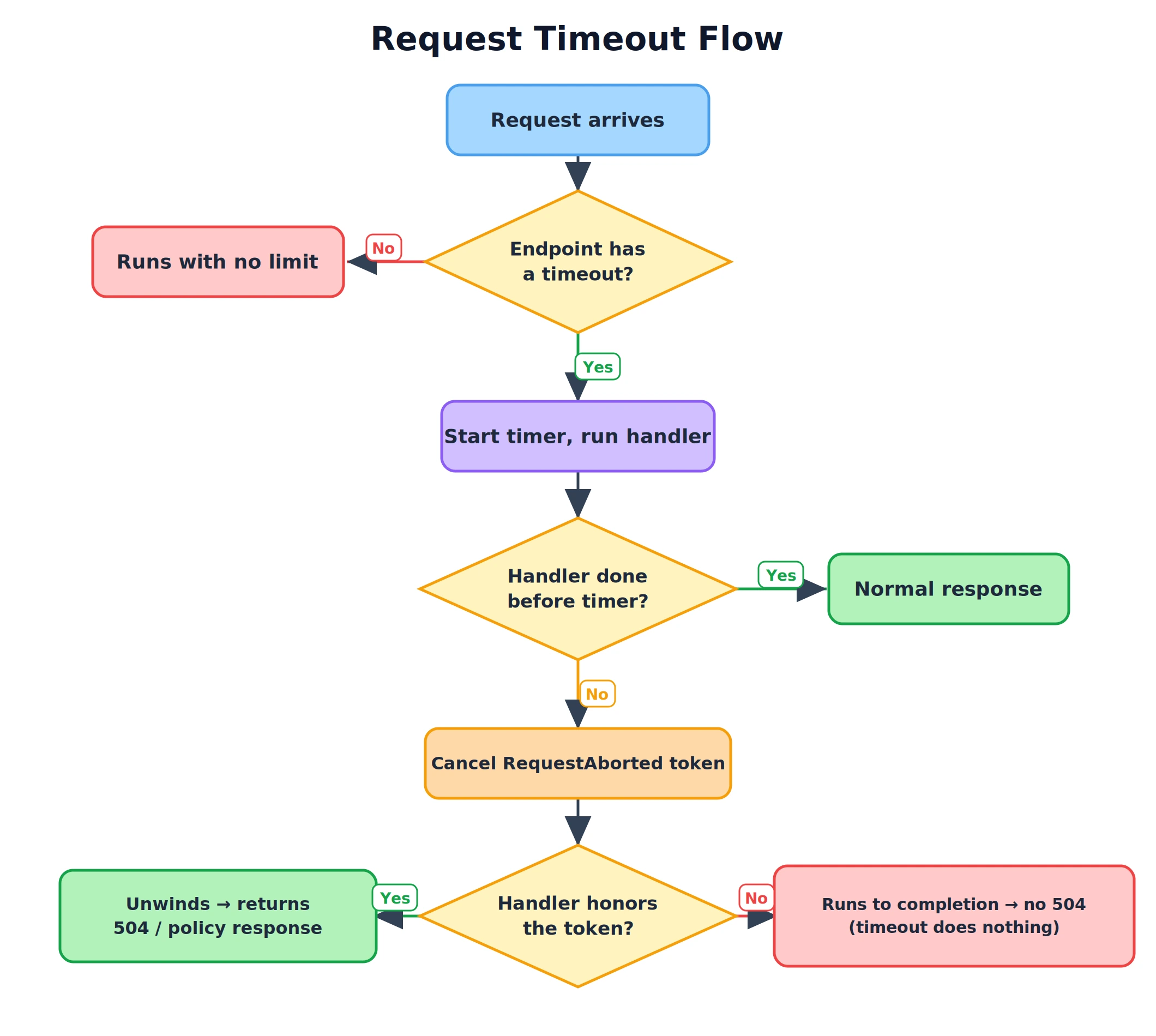
The two "No" branches are the ones that bite. No timeout means no limit. And a handler that ignores the token still finishes its work even after the timeout - so the token has to be threaded through for the timeout to mean anything.
Handling the Timeout Inside the Endpoint
Sometimes you don't want the default 504 - you want to react to the cancellation yourself, maybe to return a partial result or a friendlier message. Catch the cancellation:
app.MapGet("/report", async (ReportService service, CancellationToken ct) =>{ try { var data = await service.BuildAsync(ct); return Results.Ok(data); } catch (OperationCanceledException) { return Results.Json( new { error = "Report timed out." }, statusCode: StatusCodes.Status503ServiceUnavailable); }}).WithRequestTimeout(TimeSpan.FromSeconds(5));
One caveat: OperationCanceledException fires both when the timeout hits and when the client disconnects (that also cancels RequestAborted). If you need to tell those apart, check the timeout feature - context.Features.Get<IHttpRequestTimeoutFeature>() - but for most endpoints treating "cancelled" as "stop and return" is enough.
The Caveat That Wastes an Afternoon
You wire all this up, set a two-second timeout, hit the endpoint with a ten-second delay, and... nothing times out. The request runs the full ten seconds.
The request timeouts middleware does not fire when a debugger is attached. This is deliberate - it's the same behavior as Kestrel's timeouts, so you don't get killed mid-step while debugging. But it means you cannot test timeouts by pressing F5 in Visual Studio. Run the app without the debugger (dotnet run, or Ctrl+F5) and the timeout works as expected. I've watched more than one person conclude the feature is broken when it was just the debugger.
This Isn't the Only Timeout You Have
Request timeouts sit at the middleware layer, and they're the right tool for "cap how long this endpoint runs." But they're not the only clock in the system, and they don't replace the others:
HttpClient.Timeoutcaps an outgoing call your app makes to another service. Set it on the client - don't rely on the request timeout to bound a downstream call.- EF Core / ADO.NET command timeout caps a single database command. A request timeout will cancel the token, but a well-set command timeout gives the database a chance to stop its own work too.
- Kestrel timeouts (keep-alive, headers) protect the server at the connection level and are unrelated to how long your handler runs.
Think of the request timeout as the outer bound on the whole request, and the others as inner bounds on the specific things it does. You usually want more than one. And if the goal is keeping one caller from overwhelming the server, timeouts pair well with rate limiting - a different guardrail for the same problem.
FAQ
What status code does an ASP.NET Core request timeout return?
By default, 504 Gateway Timeout, returned when the timeout fires and the endpoint doesn't handle the cancellation itself. You can change it with TimeoutStatusCode on a RequestTimeoutPolicy (503 is a common choice), or write a fully custom response with WriteTimeoutResponse.
Does the request timeout stop my code from running?
No. It cancels the request's CancellationToken (HttpContext.RequestAborted). Your code stops only if it passes that token into its async calls and lets the resulting OperationCanceledException propagate. If you never use the token, the work runs to completion and the middleware only changes the response afterward.
Why isn't my request timeout firing?
The most common reason is a debugger being attached - the middleware is disabled in that case by design, same as Kestrel. Run without the debugger. The other reason is that adding the middleware isn't enough on its own: an endpoint has no timeout until you set one with WithRequestTimeout, [RequestTimeout], or a default policy.
Which .NET version do I need?
The request timeouts middleware ships with ASP.NET Core 8.0 and is available in every version since. Before that you had to build request-level timeouts yourself with a CancellationTokenSource linked to RequestAborted.
Wrapping Up
The default behavior of an ASP.NET Core endpoint is to wait as long as it takes, and under a slow dependency that quietly turns into parked threads, held connections, and a slowdown that spreads past the one endpoint that caused it.
The request timeouts middleware fixes that with very little code: register it, set a sensible default policy so nothing can hang forever, tighten the limit on endpoints you know should be fast, and opt the genuinely long-running ones out. Just remember the two things that make it real - thread the CancellationToken through your calls so the timeout actually stops the work, and test it without the debugger attached.
Pick one endpoint in your app that talks to something you don't control, and put a timeout on it today. It's five minutes of work and it's the difference between one slow dependency and a slow site.