Stefan Đokić
AI code review for .NET can help you investigate security and database issues across a repository. This walkthrough shows a Claude agent reviewing ASP.NET Core authorization and logging, then a focused skill inspecting EF Core queries. Treat each finding as something to verify in your application.
A quick word from me
I found a free resource from Datadog that might be useful if you're building, deploying, or operating modern applications.
This week's recommendation: Developer Toolkit for the AI Era
Inside, you'll find practical guidance on cutting CI run times, eliminating flaky tests, and shipping with more confidence as AI tools change how your team writes and deploys code.
Want to reach thousands of .NET developers like this?
Want to reach thousands of .NET developers? Sponsor TheCodeMan →The Problem: The Bug You Never See
Most serious bugs do not announce themselves. They sit quietly in a 300-file codebase until the day they cost you.
A missing [Authorize]. Sensitive values written to logs in production. An EF Core query that looks innocent but fires one round-trip per row. None of these break the build. None of these show up in a demo. They just wait.
Code review catches some of them. But review is slow, inconsistent, and the reviewer has to know exactly what to look for, every time, across every file.
So I built something to do it for me: a library of AI skills and agents for .NET that run on my actual code. Not a chat window I paste snippets into. I point a tool at a file, a folder, a whole project, or a GitHub link, and it reports back like a senior engineer - findings down to file and line, ranked by impact, with the fix.
This week I pointed the whole set at a real production .NET 10 codebase (a client project, so the name stays private). In this issue I will show you two of those tools in action, then walk you through adding one to Claude yourself so you can run it on your own code by the end of this email.

Tool #1: The Security Auditor (an agent)
The first one is an agent. Unlike a single-purpose skill, an agent explores the whole repository on its own. I gave it one instruction:
"Run a security audit on this API."
It mapped the attack surface (startup, endpoints, auth setup, configuration), checked it against the OWASP Top 10 plus .NET-specific risks, and came back with a ranked report. The headline findings:
- 🔴 Critical - Authorization coverage. Only 1 of 75 endpoints actually required authorization, and there was no fallback policy. Either a gateway was enforcing it upstream, or most of the API was effectively anonymous. It flagged it as "verify this now."
- 🔴 Critical - Sensitive data logging.
EnableSensitiveDataLogging()was turned on unconditionally, which writes query parameter values (and any PII in them) to logs in every environment, not just development. - 🟡 Medium - CORS.
AllowAnyOrigin()on an authenticated API.
Here is the part that builds trust: it did not invent problems to look useful. It explicitly passed the parts that were already solid - the auth scheme design, the use of the Result pattern, cancellation tokens threaded everywhere. A review that only ever finds problems is a review you stop believing. This one tells you what is fine, too.

The fix for the logging issue is one line, but you have to know it is there:
// Before - logs parameter values in every environmentservices.AddDbContext<AppDbContext>(o => o.UseNpgsql(connectionString) .EnableSensitiveDataLogging()); // After - only in Developmentservices.AddDbContext<AppDbContext>(o =>{ o.UseNpgsql(connectionString); if (env.IsDevelopment()) o.EnableSensitiveDataLogging();});
Tool #2: The EF Core Query Optimizer (a skill)
The second one is a skill - focused, single-purpose. I pointed it at the data layer:
"Optimize the EF Core queries in this project."
It ran a fixed checklist (N+1, tracking, projections, cartesian explosion, pagination, bulk operations) and found a query that loads more than it needs and filters in memory:
// Beforevar application = await _db.Applications .Include(app => app.ConfigurationFiles) // loads ALL config files .Where(app => app.Id == applicationId) .SingleOrDefaultAsync(ct); var results = application.ConfigurationFiles .Where(config => config.IsActive) // filtered in memory, after loading everything .Select(_mapper.ToDto) .ToList();
Two problems the skill called out:
Includepulls every related row from the database, then theIsActivefilter throws most of them away in memory.- The query tracks the whole entity graph even though nothing is being saved.
The rewrite pushes the filter into SQL, projects only what is needed, and drops change tracking:
// Aftervar results = await _db.Applications .Where(app => app.Id == applicationId) .SelectMany(app => app.ConfigurationFiles) .Where(config => config.IsActive) // now runs as a SQL WHERE .Select(config => _mapper.ToDtoExpression(config)) .AsNoTracking() .ToListAsync(ct);
Same result set, a fraction of the data transferred, no tracking overhead. The skill also reminded me to confirm it with ToQueryString() - measure, do not guess.
One agent, one skill. One finds risk across the whole repo, the other rewrites a specific hot path. That is the idea: each tool does one thing at a senior level, and you point it at your real code.
Tutorial: Add a Skill to Claude (start to finish)
Here is the part you can do right now. I will use the EF Core optimizer as the example, but every skill and agent installs the same way.
A skill is just a folder with a SKILL.md file inside (instructions plus the trigger description). An agent is a single .md file. Claude loads them automatically.
If you use Claude Code
1. Create a skills folder in your project (or globally so it is available everywhere):
# project-level: available in this repomkdir -p .claude/skills # or user-level: available in every projectmkdir -p ~/.claude/skills
2. Copy the skill folder in. Each skill is a folder like ef-core-query-optimizer/ containing SKILL.md:
cp -r ef-core-query-optimizer .claude/skills/
3. For an agent, copy the .md into the agents folder instead:
mkdir -p .claude/agentscp aspnetcore-security-auditor.md .claude/agents/
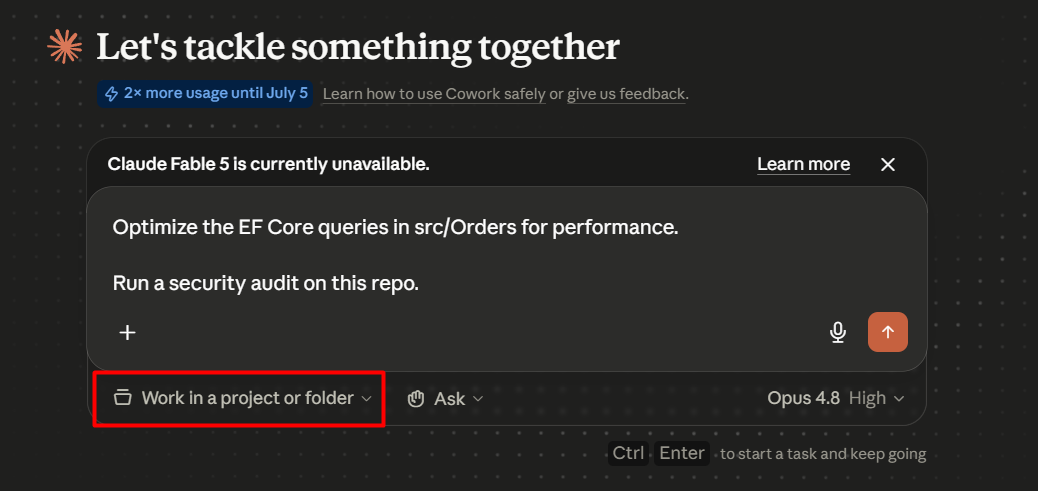
4. Start a fresh session and just ask. Skills trigger automatically when your request matches; an agent runs when you ask for what it does:
Optimize the EF Core queries in src/Orders for performance. Run a security audit on this repo.
That is it. No build step, no dependencies. Claude reads the SKILL.md, applies the checklist, and works on the files you pointed it at.
If you use the Claude desktop app (Cowork)
Even simpler. Each tool also ships as a .skill bundle (a zipped folder). Open Settings → Capabilities, add the skill, and it is installed. Then ask the same prompts as above.
Tip: point a tool at exactly what you want - a single file, a folder like
src/Orders/, a whole.sln, or even a GitHub URL. It finds the relevant files itself, so you never paste code into the chat.
Try It Yourself
I packaged the two tools from this issue so you can run them today. Download them, drop them into Claude using the steps above, and point them at your own code:
Download the two tools from this issue →
And these two are just the start. There are 50+ AI tools for .NET in the same style - architecture, EF Core, performance, observability, testing, security and DevOps - with new ones added every week.
You can try all of them inside TheCodeMan AI Toolkit on a 7-day free trial:
- Install and run any of the 50+ skills and agents on your own projects
- Get the local dashboard that catalogs everything and your run history
- Download what you want during the trial, no strings
If you just want to grab a few tools and go, the trial is enough. And if you want to stick around and keep getting new tools and learn how to use AI properly as a .NET developer, even better - that is what the community is for.
That's all from me today.