Stefan Đokić
Keywords: .NET architecture diagram from code, Miro MCP server, AI architecture diagrams, EF Core ER diagram, generate ER diagram from DbContext, sequence diagram ASP.NET Core, Clean Architecture diagram, Claude Code MCP, living documentation .NET, architecture documentation
The Problem: Architecture Diagrams Go Stale
A lot of .NET projects have an architecture diagram somewhere. It was drawn at the start of the project, or the week before an architecture review, usually by one person, by hand. After that the code keeps changing and the diagram doesn't.
A new project gets added to the solution. Someone references Infrastructure from Application because it was the fastest way to get a feature out. Five new entities land in the DbContext. None of that shows up on the diagram, because updating boxes and arrows is nobody's job.
After a few months the diagram describes a system that doesn't exist anymore. New developers learn the wrong picture first, and the people who know the real picture stop opening the diagram at all.
The underlying issue is that the diagram and the code are two separate artifacts, and only the code is maintained. If the diagram could be generated from the code, keeping it current would cost a prompt instead of an afternoon.
In this post I'll show how to do that with an AI coding agent and the Miro MCP server: the agent reads a .NET solution and draws three diagrams directly onto a Miro board - an architecture diagram of the layers, an ER diagram from the EF Core DbContext, and a sequence diagram of one request from the controller to the database.
I also recorded the whole thing as a video: watch the walkthrough on YouTube. This post is sponsored by Miro.
How It Works
An AI coding agent like Claude Code or Cursor already has access to your code on disk. MCP (Model Context Protocol) is the standard way to give the same agent access to other tools. The Miro MCP server is one of those tools: it exposes Miro boards to the agent, so it can read what's on a board and create content on it.
Put together, the agent has two sources of context:
- Your repository
- the
.sln,.csprojfiles, theDbContext, controllers and handlers.
- the
- Your Miro board
- the place where the diagrams end up.
You write a prompt describing what to analyze and what to draw. The agent reads the relevant files, works out the structure, and calls the Miro MCP server to draw the result on the board.
The important detail is that the agent reads the code itself - the project references, the entity configurations, the actual call chain. It's not working from folder names or from your description of the system. That's what makes the diagram reflect what the code does, not what someone remembers.
Connecting the Agent to Miro
The Miro MCP server is a remote server at https://mcp.miro.com/. You don't install or host anything. Setting it up is free - all you need is a Miro account, so if you don't have one yet, create one here before you start.
In Claude Code, add it with one command:
claude mcp add --transport http miro https://mcp.miro.com
Miro also publishes a Claude Code plugin that bundles the server:
/plugin marketplace add miroapp/miro-ai/plugin install miro@miro-ai
In Cursor, add it to your MCP settings:
{ "miro": { "url": "https://mcp.miro.com/" }}
VS Code with GitHub Copilot can install it from the GitHub MCP Registry, and Claude Desktop and ChatGPT have it as a connector.
The first time the agent calls Miro, you're redirected to a Miro sign-in page. You log in, pick the team, and authorize access. The agent can only work with boards in that team, so if you use Miro at work, pick the team where the diagrams should live.
Then create an empty board for the diagrams in Miro and copy its link. You'll pass it to the agent in the prompts.
The Sample Solution
The sample is a standard Clean Architecture solution on .NET 8 with EF Core 8 and SQLite - a small shop API:
ShopApi.sln├── ShopApi.Domain // entities (Order, Product, Customer), no dependencies├── ShopApi.Application // commands, handlers, abstractions├── ShopApi.Infrastructure // EF Core AppDbContext, configurations, repositories└── ShopApi.Api // controllers, Program.cs, Swagger
The dependency rule is the usual one: Domain depends on nothing, Application depends on Domain, Infrastructure implements Application's abstractions (IOrderRepository, IProductRepository), and Api wires everything together.
The data model is small: customers, orders, order items and products.
public class AppDbContext : DbContext{ public AppDbContext(DbContextOptions<AppDbContext> options) : base(options) { } public DbSet<Customer> Customers => Set<Customer>(); public DbSet<Product> Products => Set<Product>(); public DbSet<Order> Orders => Set<Order>(); public DbSet<OrderItem> OrderItems => Set<OrderItem>(); protected override void OnModelCreating(ModelBuilder modelBuilder) { modelBuilder.ApplyConfigurationsFromAssembly(typeof(AppDbContext).Assembly); base.OnModelCreating(modelBuilder); }}
The relationships live in IEntityTypeConfiguration classes, which is where most real projects keep them. This is the one for Order:
public class OrderConfiguration : IEntityTypeConfiguration<Order>{ public void Configure(EntityTypeBuilder<Order> builder) { builder.HasKey(o => o.Id); builder.Property(o => o.Status).HasConversion<int>(); builder.HasMany(o => o.Items) .WithOne(i => i.Order) .HasForeignKey(i => i.OrderId) .OnDelete(DeleteBehavior.Cascade); // Total is computed in the domain, not stored builder.Ignore(o => o.Total); }}
CustomerConfiguration and ProductConfiguration configure the other two relationships the same way, both with DeleteBehavior.Restrict.
It's a typical .NET backend.
Diagram 1: The Architecture Diagram
These are the exact prompts I used in the video. The first one asks for the layers and the dependencies between them:
Analyze this .NET solution's structure and create an architecture diagramon my Miro board <BOARD_LINK>. Show each project as a layer and draw thedependencies between them.
To answer it, the agent has to read the .sln and the .csproj files with their ProjectReference entries - folder names alone don't tell you the dependencies. This is the diagram it drew for ShopApi:
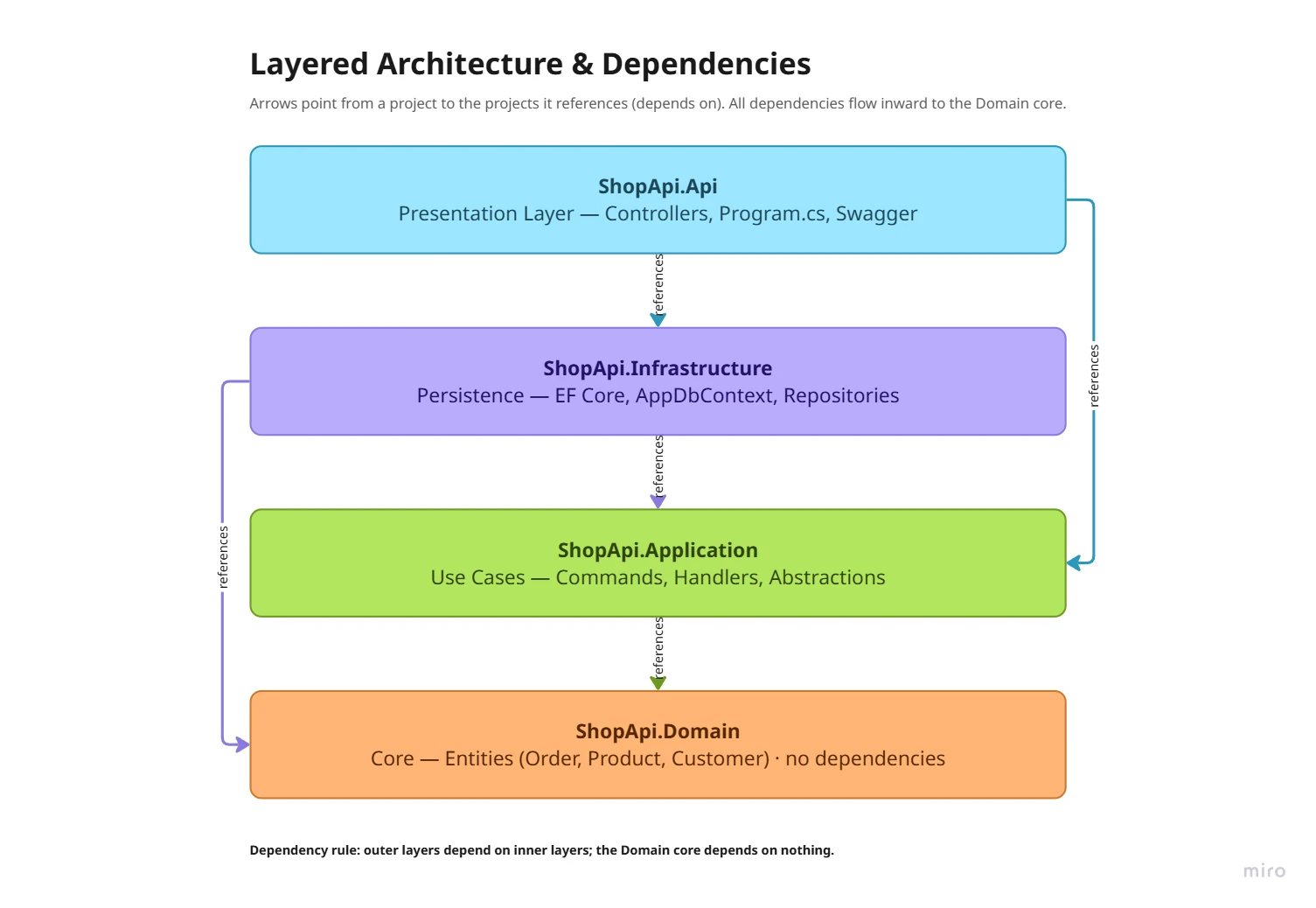
Api references Application and Infrastructure, Infrastructure references Application and Domain, and Application references only Domain. Every arrow points inward, which is exactly what the Clean Architecture dependency rule asks for.
Because the diagram comes from the real references, it would also show it if the rule were broken. A reference like this, added "temporarily" in the Application project, is easy to miss in a code review:
<ItemGroup> <ProjectReference Include="..\ShopApi.Domain\ShopApi.Domain.csproj" /> <ProjectReference Include="..\ShopApi.Infrastructure\ShopApi.Infrastructure.csproj" /></ItemGroup>
On a diagram built from the references, it would show up as an arrow from Application to Infrastructure, pointing the wrong way. If you want the agent to call those out explicitly, add one line to the prompt: "Highlight in red any reference that breaks the Clean Architecture dependency rule."
You can verify what the agent found with the .NET CLI, which lists the references of one project:
dotnet list ShopApi.Application reference
Diagram 2: ER Diagram from the EF Core DbContext
The second prompt goes to EF Core. For the data model, the DbContext, the configurations and the entities are the source of truth in code:
Read my EF Core DbContext and entity classes, and create an ER diagram onthe Miro board showing the tables, columns, keys, and relationships.
The agent picks up the DbSet properties, the keys, the HasMany / WithOne calls, the foreign keys and the OnDelete behavior, and draws the entities and relationships:
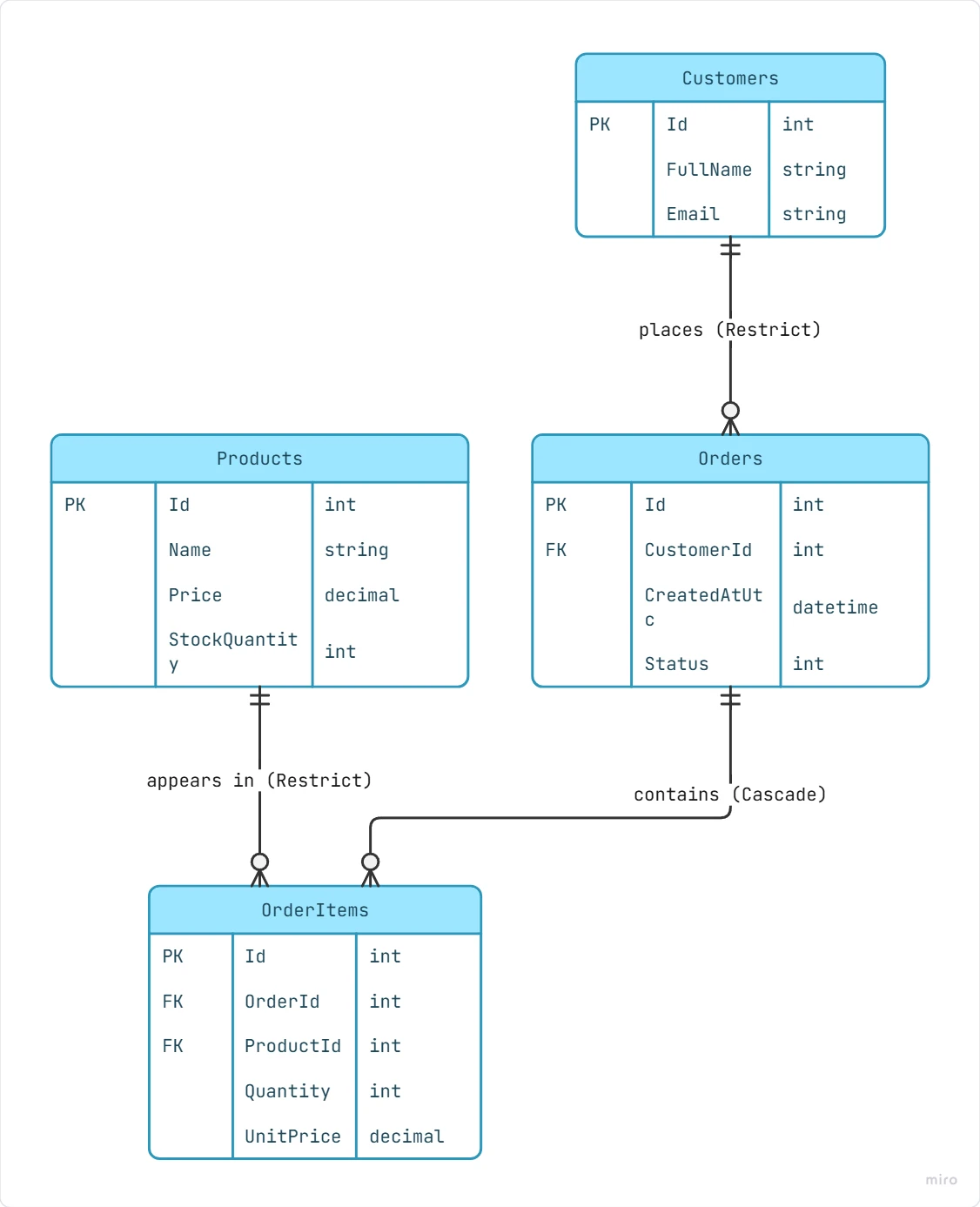
Each relationship carries its delete behavior from the configuration. A customer places many orders (Restrict, so you can't delete a customer who has orders), an order contains many order items (Cascade, so deleting an order deletes its items), and a product appears in many order items (Restrict). That's the kind of detail that's easy to forget when you draw an ER diagram by hand, and it matters when someone asks "what happens if we delete this?".
Two practical notes:
- If your relationships are configured by convention (no explicit
HasOne/HasMany), tell the agent to also read the navigation properties on the entities. Otherwise it may miss relationships that EF Core infers. - If you want the exact database schema rather than the model as written in code, point the agent at the migrations folder or the
ModelSnapshotclass. The snapshot is the model EF Core generated the last migration from, including column types and indexes.
Diagram 3: Sequence Diagram of One Request
The third diagram is the one teams almost never draw by hand: the actual path of one request through the code.
In the sample, creating an order goes through a controller, an Application layer handler, two repositories and the AppDbContext. The controller passes the command to the handler and maps the outcome to an HTTP response:
[HttpPost]public async Task<IActionResult> Create([FromBody] CreateOrderCommand command, CancellationToken ct){ try { var result = await _createOrder.HandleAsync(command, ct); return CreatedAtAction(nameof(GetById), new { id = result.OrderId }, result); } catch (ArgumentException ex) { return BadRequest(new { error = ex.Message }); } catch (InvalidOperationException ex) { return UnprocessableEntity(new { error = ex.Message }); }}
Exceptions for validation aren't my favorite pattern (a Result type is cleaner), but this is what the sample does, and the diagram has to match the code.
The handler validates the command, loads the products, builds the order and saves it:
public async Task<CreateOrderResult> HandleAsync(CreateOrderCommand command, CancellationToken ct = default){ if (command.Items is null || command.Items.Count == 0) throw new ArgumentException("An order must contain at least one item."); var productIds = command.Items.Select(i => i.ProductId).Distinct().ToList(); var products = await _products.GetByIdsAsync(productIds, ct); if (products.Count != productIds.Count) throw new InvalidOperationException("One or more products do not exist."); var order = new Order { CustomerId = command.CustomerId, Status = OrderStatus.Pending, Items = command.Items.Select(i => { var product = products.First(p => p.Id == i.ProductId); return new OrderItem { ProductId = product.Id, Quantity = i.Quantity, UnitPrice = product.Price }; }).ToList() }; await _orders.AddAsync(order, ct); await _orders.SaveChangesAsync(ct); return new CreateOrderResult(order.Id, order.Total);}
The prompt asks the agent to trace that path and draw it:
Trace the 'Create Order' request flow from the controller through thehandler to the database, and draw it as a sequence diagram on the Miro board.
The agent follows the code from OrdersController.Create to CreateOrderHandler.HandleAsync, into IProductRepository and IOrderRepository, through AppDbContext, and down to the database:
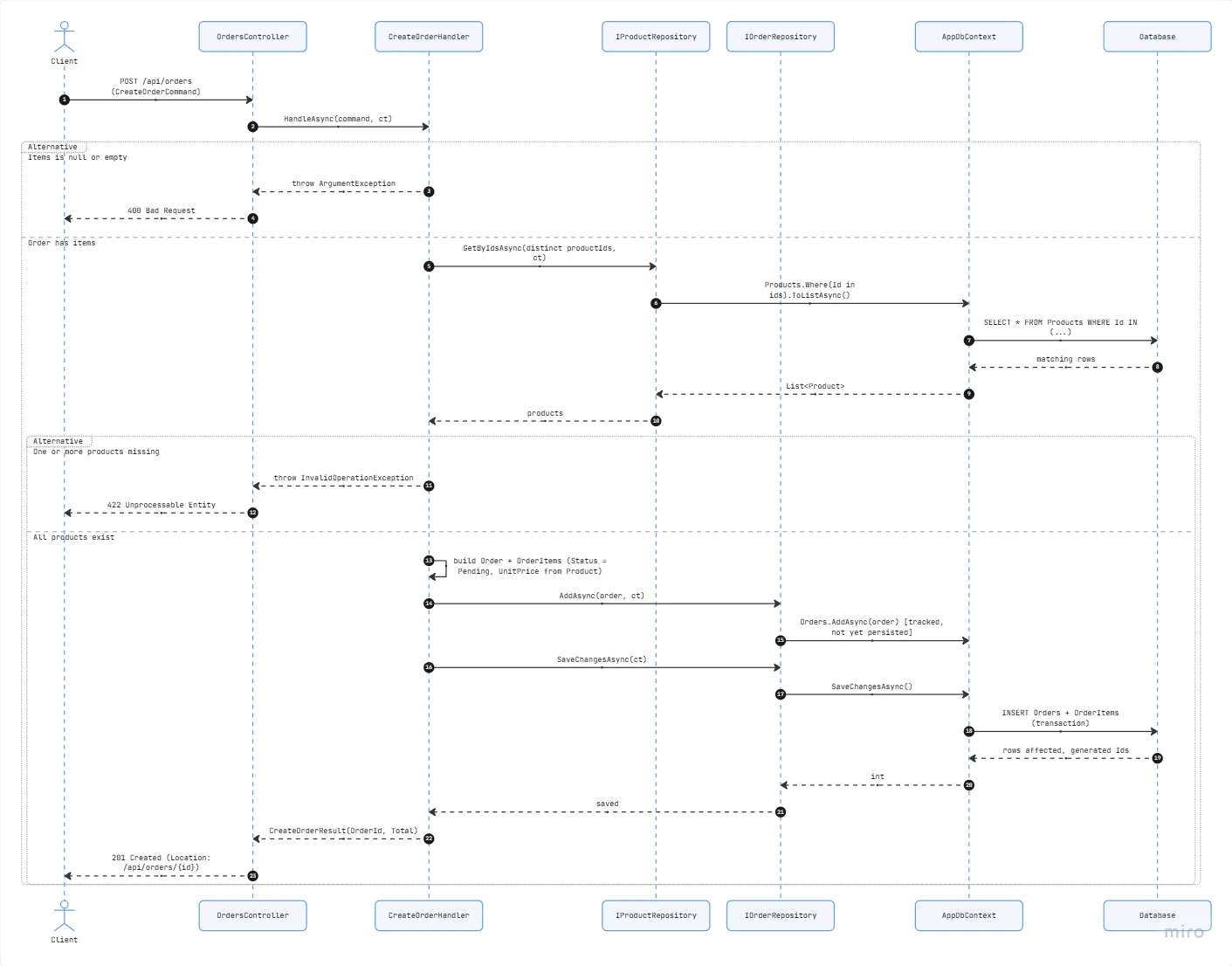
The diagram has three paths, because the code has three outcomes. If the command has no items, the handler throws ArgumentException and the client gets 400 Bad Request. If a product is missing, it throws InvalidOperationException and the client gets 422 Unprocessable Entity. Otherwise the order is built, AddAsync tracks it, SaveChangesAsync inserts the order and its items in one transaction, and the client gets 201 Created with the location of the new order.
It also shows details that are easy to lose when you read the code file by file: that AddAsync only tracks the entity and nothing hits the database until SaveChangesAsync, and a short description of the query each step sends. That's the agent's summary, not EF Core's generated SQL. For the exact SQL, turn on EF Core logging.
One thing to watch for with sequence diagrams: an agent can add steps that a "typical" request would have, like caching or logging, even when the code doesn't do them. If that happens, add "Only include calls that exist in the code" to the prompt.
Where This Pays Off
Having the three diagrams on one board, generated from the same code, is useful in a few specific situations:
- Onboarding. A new developer gets the layers, the data model and a real request flow before reading a single file. Because the board was generated from the current code, it matches what they'll see when they open the solution.
- Architecture reviews. You review what the code does, not a diagram someone drew from memory. Wrong-direction dependencies are visible, and the team can put sticky notes and comments right next to them on the board.
- Before a refactoring. Generating the sequence diagram of a request you're about to change shows every class involved. That's a good way to scope the change before you start.
- Documentation that stays current. When the structure changes, you run the same prompts again. The diagram becomes a byproduct of the code instead of a separate artifact someone has to maintain.
Making It Repeatable
Running the prompts once is useful. Running the same prompts every time the structure changes is what keeps the diagrams current. The simplest way to do that is to keep the prompts in the repository.
In Claude Code, a Markdown file in .claude/commands/ becomes a slash command for everyone who clones the repo:
<!-- .claude/commands/diagrams.md -->Regenerate the architecture documentation on the Miro board: $ARGUMENTS 1. Read the .sln and every .csproj. Draw the architecture diagram: projects as layers, ProjectReference as arrows, violations of the dependency rule in red.2. Read the DbContext, all IEntityTypeConfiguration classes and the Domain entities. Draw the ER diagram with keys and cardinality.3. Trace POST /api/orders from the controller to SaveChangesAsync. Draw the sequence diagram. Only include calls that exist in the code. Place the three diagrams next to each other and add a frame titledwith today's date.
Then anyone on the team runs /diagrams <BOARD_LINK> after a larger change, or before an architecture review.
A diagram shows a broken dependency rule, but it doesn't stop the next one from being merged. If the rule matters, enforce it with an architecture test as well. With NetArchTest it's a few lines:
[Fact]public void Application_should_not_depend_on_Infrastructure(){ var result = Types.InAssembly(typeof(CreateOrderHandler).Assembly) .ShouldNot() .HaveDependencyOn("ShopApi.Infrastructure") .GetResult(); Assert.True(result.IsSuccessful);}
The test fails the build. The diagram explains the structure to people.
Things to Keep in Mind
- Review the first version. The agent's diagram is only as accurate as what it read. Check the first run against what you know about the system, the same way you'd review generated code. After that, regenerating is cheap.
- Scope the prompt. On a large solution, "draw the whole system" gives you a diagram nobody can read. Ask for one bounded context, one module, or one request at a time.
- Be specific about the source. "Read the .csproj files" and "read the DbContext and configurations" give much better results than "look at the project". The agent follows the files you name.
- Know what goes to the board. The agent reads your code locally, but whatever it draws - project names, entity names, properties, class names - ends up on the Miro board. Use a board in the right team and with the right sharing settings.
FAQ
What is the Miro MCP server?
It's Miro's official remote MCP (Model Context Protocol) server at https://mcp.miro.com/. It lets an AI agent such as Claude Code, Cursor, VS Code with GitHub Copilot or ChatGPT read Miro boards and create content on them. You authorize it with your Miro account through OAuth, and the agent only gets access to boards in the team you select.
Can AI generate an architecture diagram from .NET code?
Yes, if the agent can read the code. Point it at the solution, tell it to read the .sln and .csproj files and the project references, and ask it to draw the result. Because the diagram comes from the real ProjectReference entries, it shows the dependencies the code actually has, including ones that break your architecture rules.
Can I generate an ER diagram from an EF Core DbContext?
Yes. The DbContext and the IEntityTypeConfiguration classes describe the entities, keys and relationships. An agent that reads them can draw an ER diagram with the entities, primary and foreign keys and the cardinality of each relationship. For the exact database schema, you can also point it at the migrations or the model snapshot.
How do I keep architecture diagrams up to date?
Generate them from the code instead of drawing them by hand. Save the prompts in the repository, for example as a Claude Code slash command, and run them again whenever the structure changes. Combine that with architecture tests (for example NetArchTest) so dependency rules are enforced in CI and not only shown on a diagram.
Wrapping Up
Hand-drawn architecture diagrams go stale because nobody maintains them alongside the code. Generating them from the code fixes that: an AI agent reads the solution, and the Miro MCP server gives it a place to draw the result.
With three prompts you get an architecture diagram built from the real project references, an ER diagram from the EF Core DbContext, and a sequence diagram of one request from the controller to the database. Keep the prompts in the repository, run them when the structure changes, and back the important rules with an architecture test.
You can set up the Miro MCP server here: Miro MCP. And the full walkthrough is on YouTube: AI drew my entire .NET architecture on Miro.