A quick word from me
This issue isn't sponsored - I write these deep dives in my free time and keep them free for everyone. If your company sells AI tools, dev tools, courses, or services that .NET developers would actually use, sponsoring an issue is the most direct way to reach them.
Want to reach thousands of .NET developers? Sponsor TheCodeMan →The Background
Let's be honest:
Running a distributed application locally is painful.
You need Docker Compose for databases, 5 terminals for your services, hardcoded connection strings copied across config files, and a prayer that you started everything in the right order.
I've been there. Multiple times. And every time a new developer joins the team, they spend half a day just getting the system running.
Aspire changes that completely.
In today's article, I'll show you what Aspire is, why it exists, and how it orchestrates a real distributed application - with .NET, TypeScript, and Python services - from a single command.
I built a demo (GitHub Copilot built it) called OrderCanvas to demonstrate this in practice. Let's dive in...
What Is Aspire?
First things first - you might have seen older articles calling it ".NET Aspire".
It's just "Aspire" now.
Microsoft dropped the ".NET" prefix because the tool isn't limited to .NET services. The orchestrator happens to be built with .NET (or TypeScript), but the services it manages can be written in any language. The rebranding reflects what it always was: a language-agnostic orchestration tool.
So what is it exactly?
Aspire is a code-first orchestration layer for distributed applications.
Think of it this way: when you're building a system with multiple services, databases, and caches, you face a fundamental problem - how do you run all of this locally?
How do you make sure every service can find every other service? How do you see what's happening across 5 different processes?
Aspire solves this by giving you a single place to describe your entire system: the AppHost.
The AppHost is a small project that defines:
- What infrastructure you need (PostgreSQL, Redis, RabbitMQ, etc.)
- What services exist (APIs, frontends, workers - in any language)
- How they connect to each other
- What should start before what
When you run the AppHost, Aspire:
- Starts everything with one command - containers, APIs, frontends, workers
- Wires connections automatically - database URLs, cache connections, service endpoints are injected as environment variables
- Provides a unified dashboard with logs, traces, metrics, and health for all services
- Manages the full lifecycle
- from pulling Docker images to creating Python virtual environments to running
npm install
- from pulling Docker images to creating Python virtual environments to running
But here's the thing: the AppHost's language is independent of the services' languages. You can orchestrate .NET, TypeScript, Python - or anything else - from a single AppHost.
Why Do You Need This?
You might be thinking: "I already have Docker Compose. It works fine."
And yes, Docker Compose can start containers. But let me describe what a typical day looks like without Aspire when you're working on a distributed app:
- You open your project and run
docker-compose up -dto start PostgreSQL and Redis - You open a second terminal and
dotnet runyour first API - You open a third terminal and
dotnet runyour second API - You open a fourth terminal, run
npm install, thennpm run devfor the frontend - You open a fifth terminal, create a Python venv, install dependencies, and run the worker
- Something doesn't connect. You check the connection string. It's wrong. You fix it. Restart.
- A new developer joins the team. They spend half a day repeating all of this.
That's 5 terminals, 3 config files with connection strings, manual startup order, and zero unified logging.
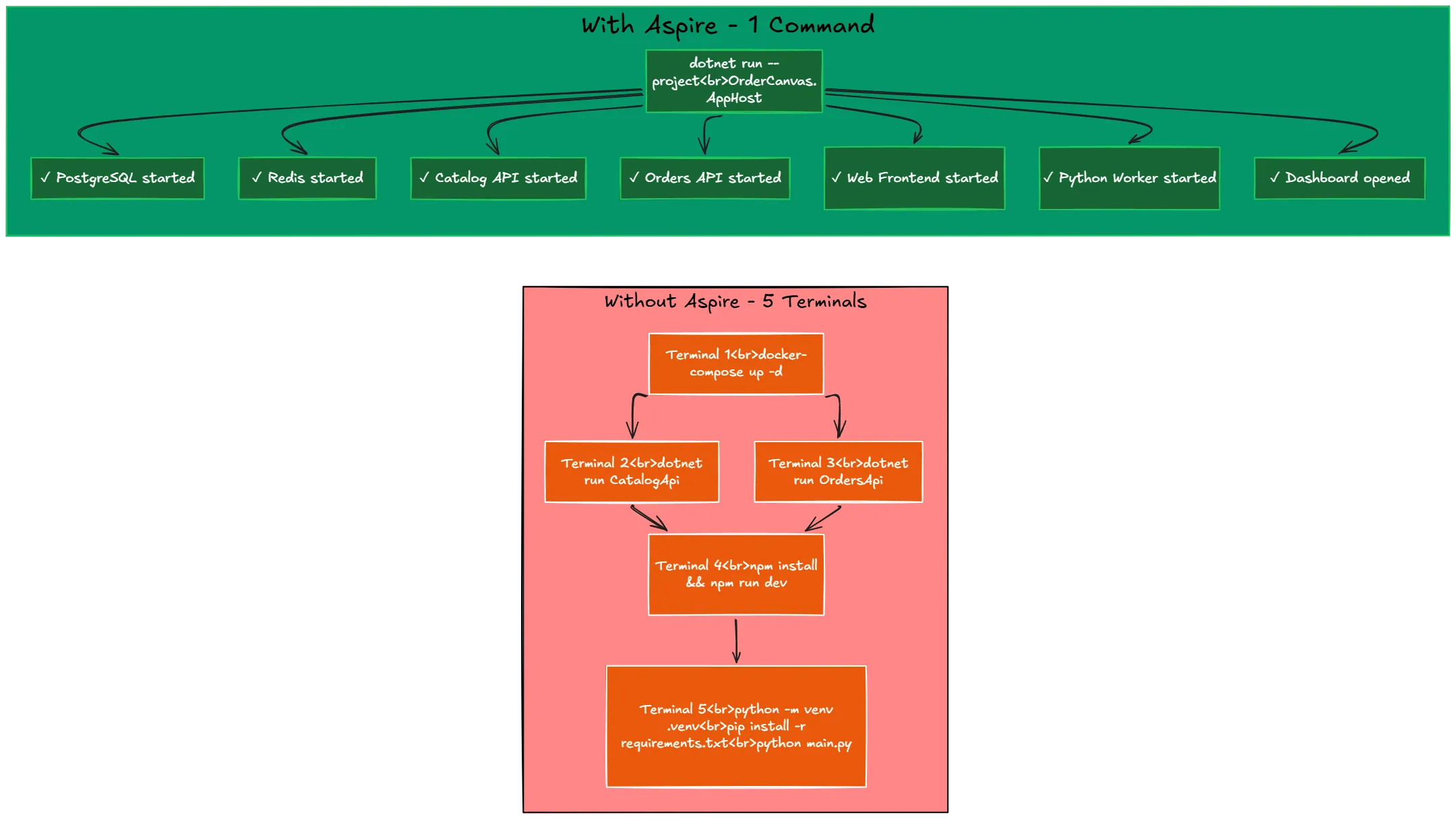
Now here's what it looks like with Aspire:
- You run
dotnet run --project src/OrderCanvas.AppHost - Everything starts. Dashboard opens. You're done.
That's not a simplification for the article. That's literally it.
Aspire is useful because it eliminates three categories of pain:
Pain #1: Startup complexity. You shouldn't need a 20-step README to run your own project. Aspire replaces that with one command.
Pain #2: Configuration drift. When connection strings live in 4 different config files, they will get out of sync. Aspire declares them once and injects them everywhere.
Pain #3: Invisible failures. When your order isn't processing, is it the API? The database? The worker? With 5 separate terminal windows, good luck finding the answer. Aspire's dashboard shows logs, traces, and health for everything in one place.
If you're building anything with more than one service and a database, Aspire removes friction you didn't even realize you were living with.
OrderCanvas - The Demo
To show what Aspire actually does, I built OrderCanvas - a small order and fulfillment platform with:
- Catalog API (.NET) - serves product data from PostgreSQL with Redis caching
- Orders API (.NET) - creates and manages orders in PostgreSQL
- Web Frontend (React + TypeScript + Vite) - browser UI for browsing and ordering
- Fulfillment Worker (Python) - background service that processes pending orders
- PostgreSQL
- relational database (containerized by Aspire)
- Redis
- cache layer (containerized by Aspire)
Six components. Three languages. One AppHost.
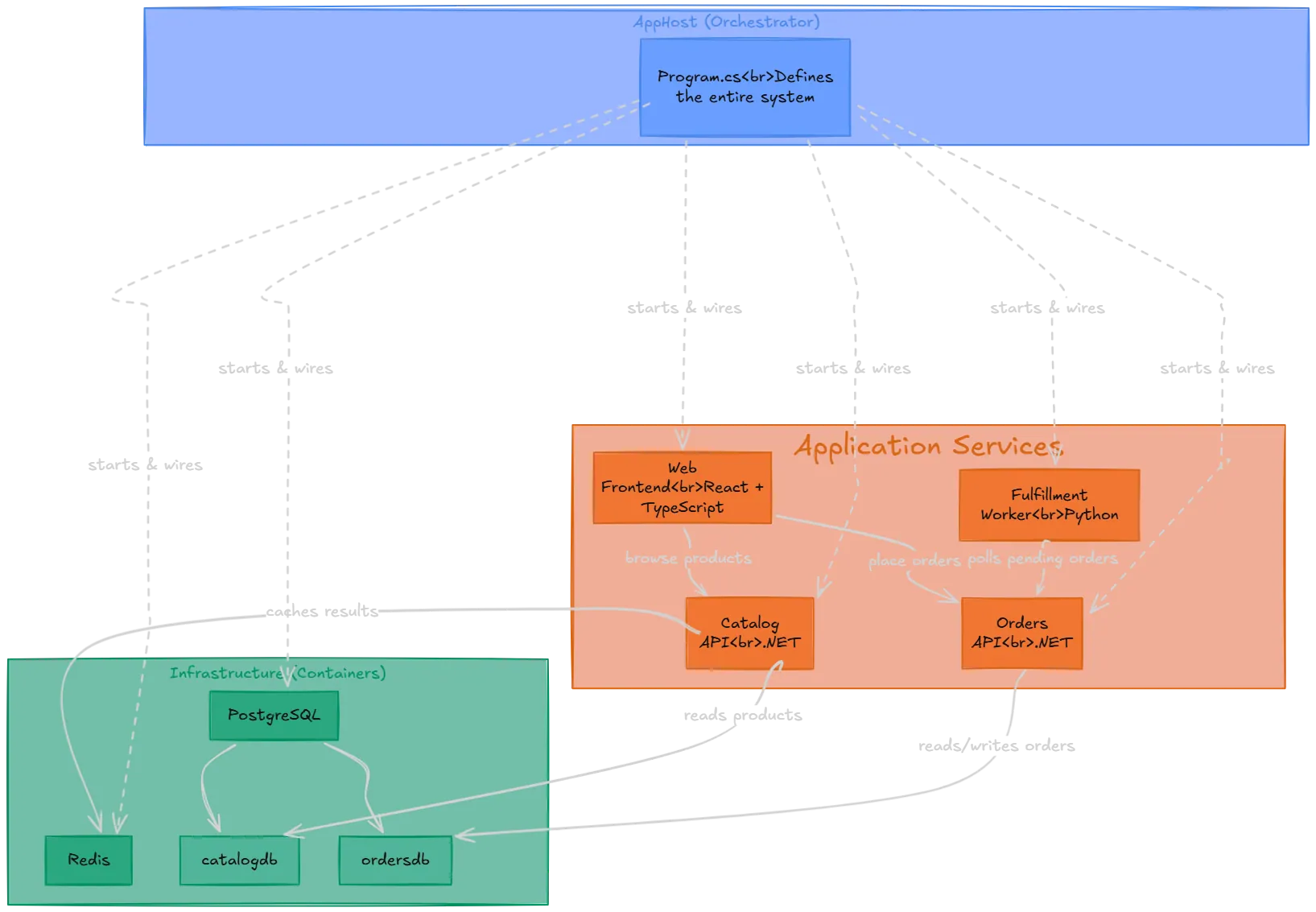
Let me explain how this all fits together.
The AppHost - One Place to Define Everything
This is the entire orchestration - Program.cs in the AppHost project:
var builder = DistributedApplication.CreateBuilder(args); // Infrastructurevar postgres = builder.AddPostgres("postgres");var catalogDb = postgres.AddDatabase("catalogdb");var ordersDb = postgres.AddDatabase("ordersdb");var redis = builder.AddRedis("redis"); // .NET APIsvar catalogApi = builder.AddProject<Projects.OrderCanvas_CatalogApi>("catalog-api") .WithReference(catalogDb) .WithReference(redis) .WaitFor(catalogDb) .WaitFor(redis); var ordersApi = builder.AddProject<Projects.OrderCanvas_OrdersApi>("orders-api") .WithReference(ordersDb) .WaitFor(ordersDb); // React Frontendbuilder.AddViteApp("web", "../ordercanvas-web") .WithReference(catalogApi) .WithReference(ordersApi) .WaitFor(catalogApi) .WaitFor(ordersApi); // Python Workerbuilder.AddPythonApp("fulfillment", "../ordercanvas-fulfillment", "main.py") .WithReference(ordersApi) .WaitFor(ordersApi); builder.Build().Run();
That's it. No Docker Compose. No hardcoded ports. No manual connection strings.
A few things to notice:
WithReference()- tells Aspire to inject the connection string or URL for that dependency
WaitFor()- ensures a service doesn't start until its dependency is healthy
AddPostgres()/AddRedis()- Aspire pulls and runs the containers for you
AddViteApp()/AddPythonApp()- Aspire handles npm install, venv creation, pip install, everything
Running It
One command:
dotnet run --project src/OrderCanvas.AppHost
What happens behind the scenes:
- PostgreSQL and Redis containers start automatically
- Databases
catalogdbandordersdbare created - Both .NET APIs launch with correct connection strings injected
npm install+npm run devruns for the React frontend- Python venv is created, dependencies installed, worker starts
- The Aspire Dashboard opens in your browser
Within 30-60 seconds, everything is running. No Docker Compose file. No 5 terminals. No setup guide.
The Dashboard - All Services, One Place
The Aspire Dashboard is where the magic becomes visible.
You get a Resources tab that shows every component with live health status:
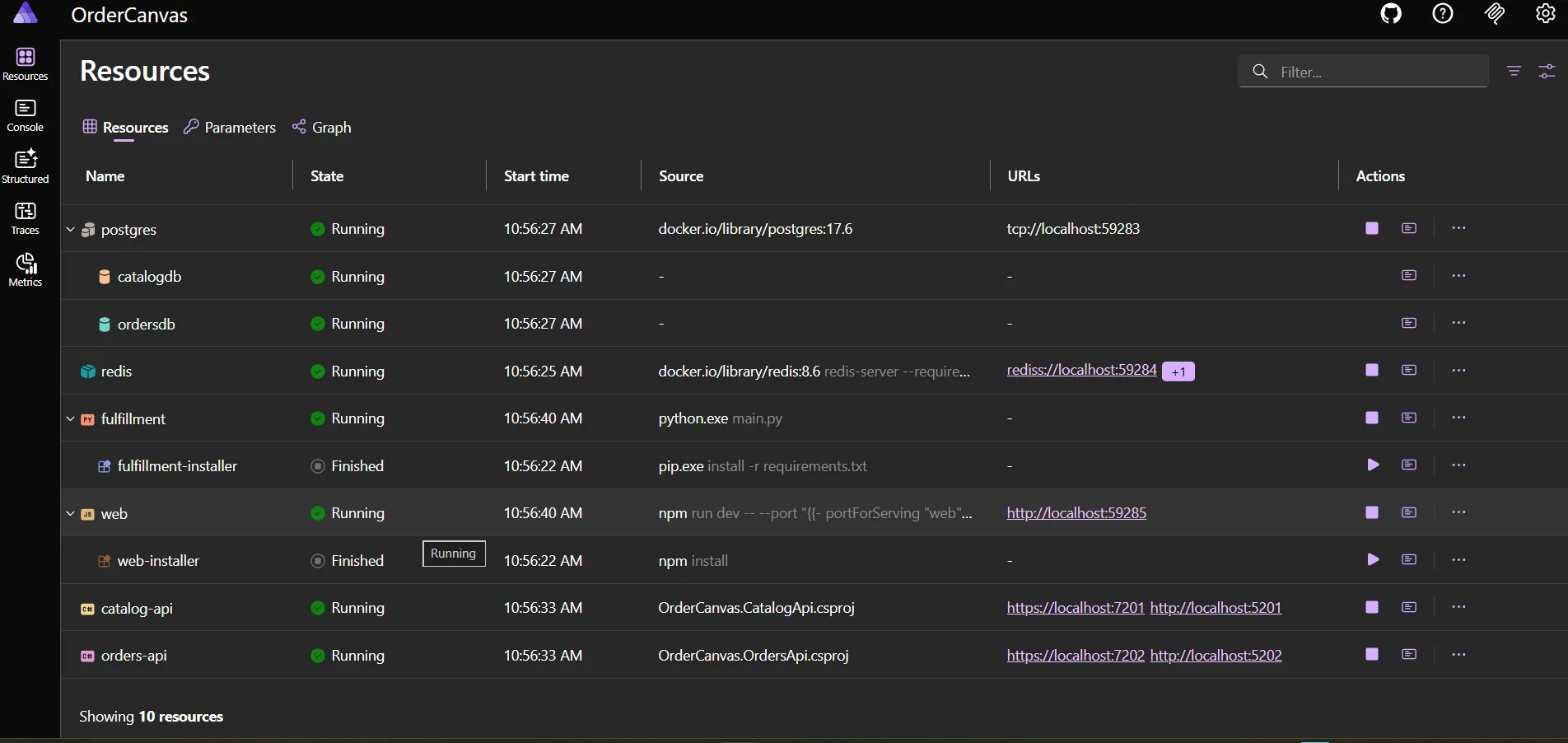
In addition you can see the graph of dependendies between services, for better understanding of the system topology:
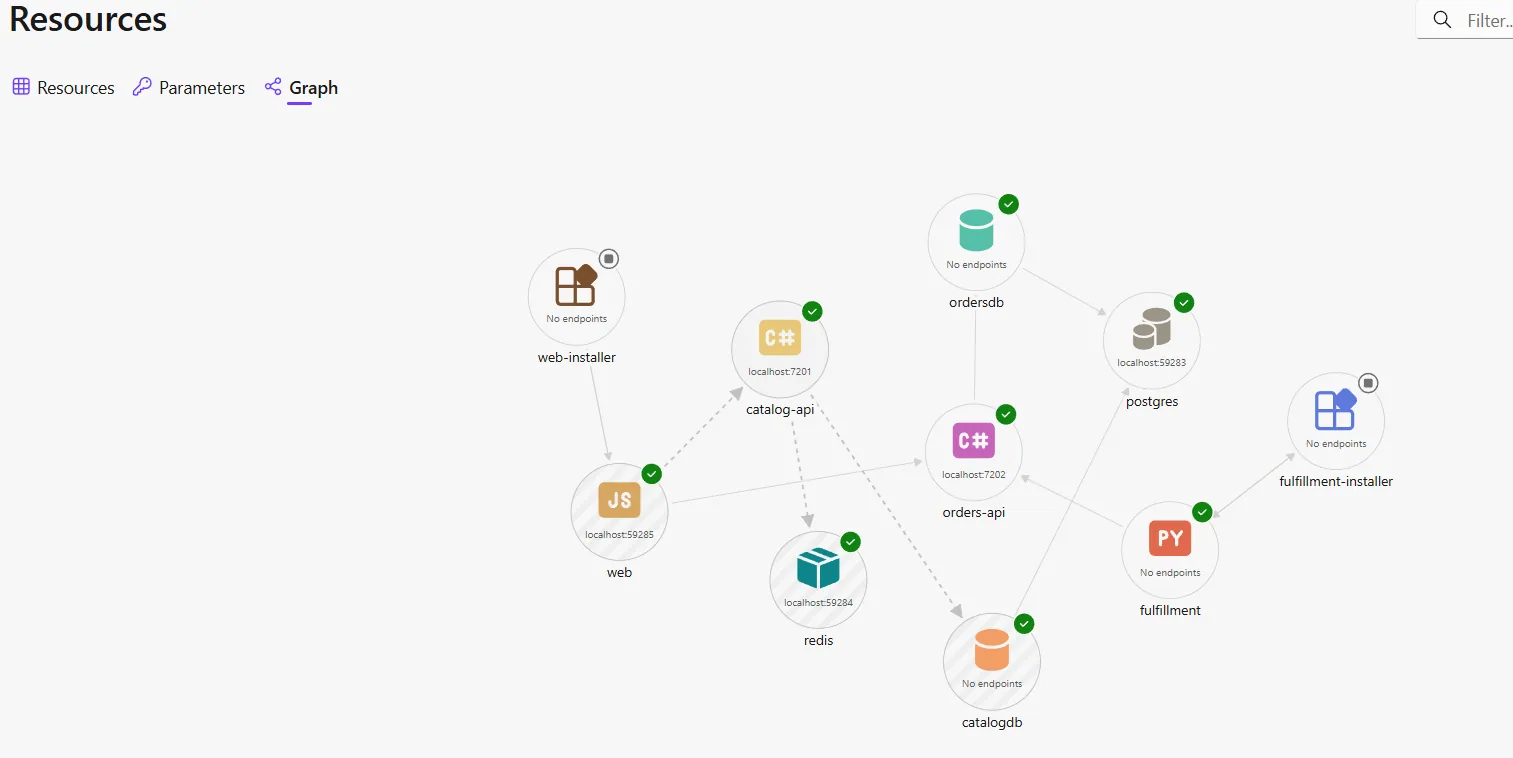
But the dashboard gives you much more:
- Structured Logs
- logs from ALL services in one view, filterable by service
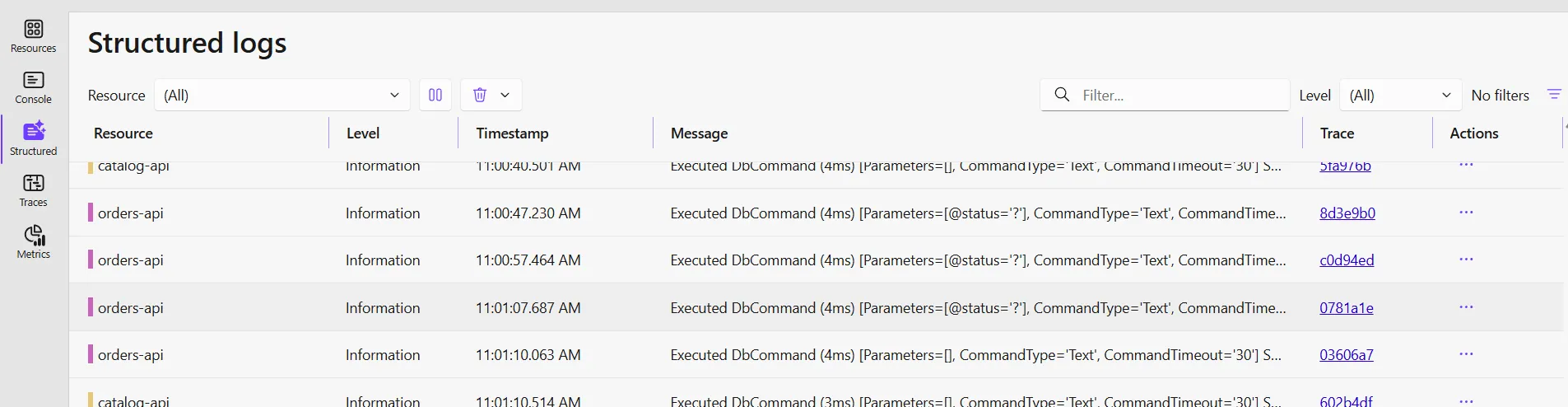
- logs from ALL services in one view, filterable by service
- Traces
- distributed traces across service boundaries (Browser → API → Database)
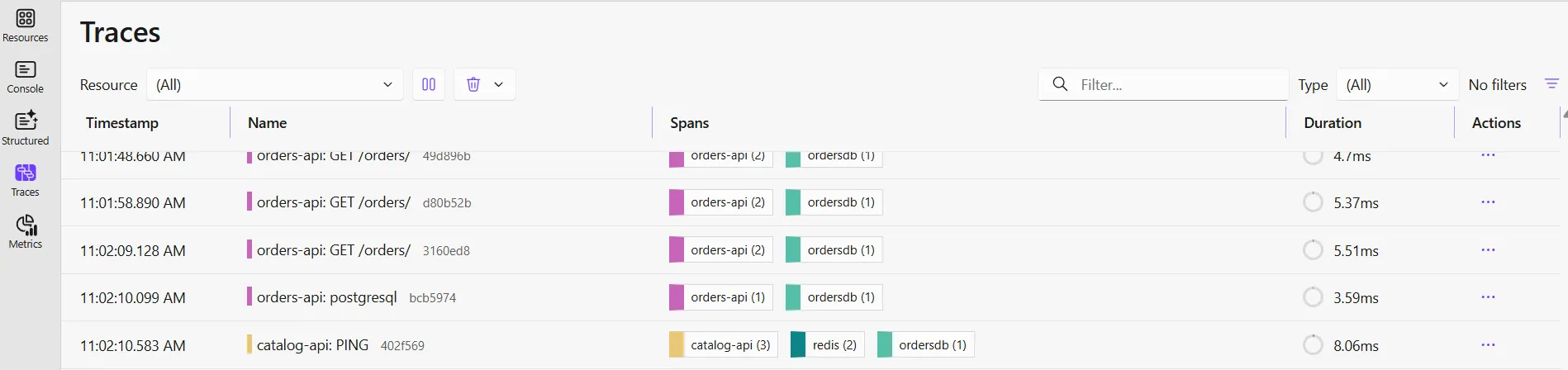
- distributed traces across service boundaries (Browser → API → Database)
- Metrics/Health Checks
- automatic monitoring for all services
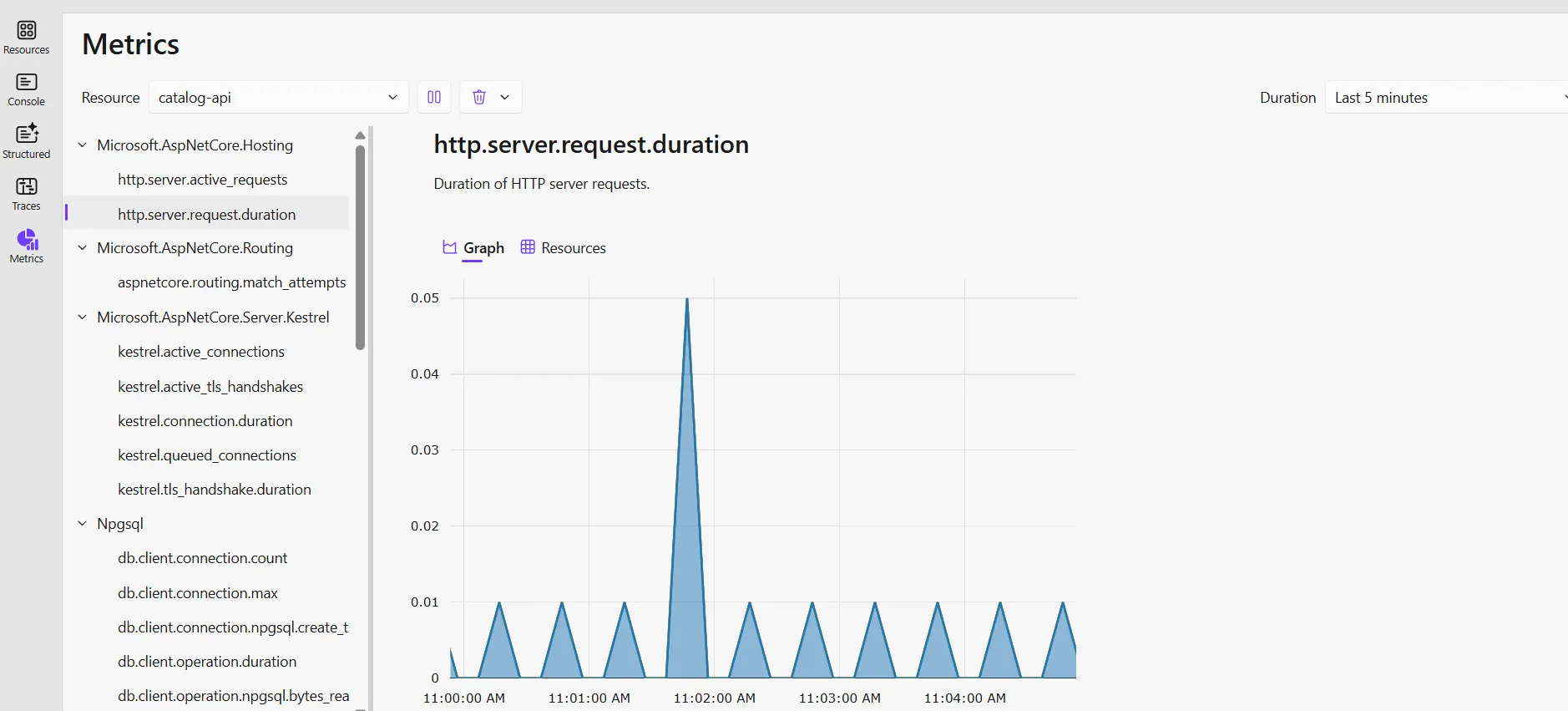
- automatic monitoring for all services
- Console Logs
- see the Python worker's output in real-time
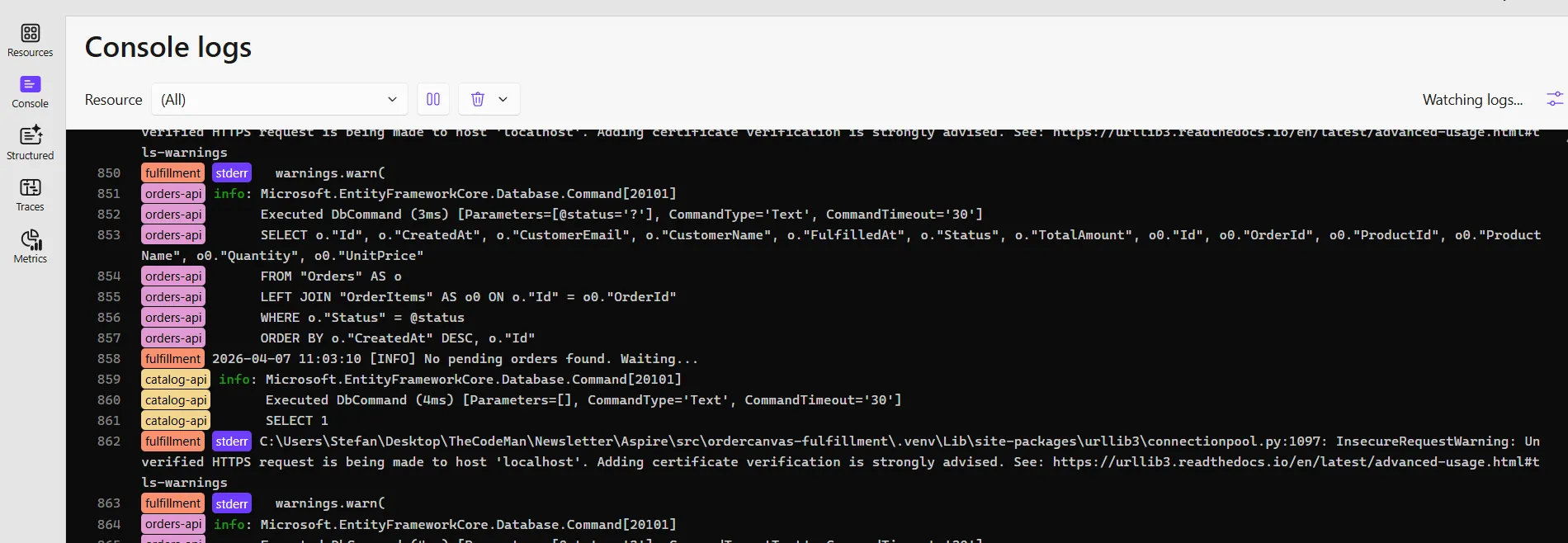
- see the Python worker's output in real-time
No Jaeger. No Zipkin. No Grafana setup. It's all built in.
How Services Wire Together
Let me walk through real request flows - because this is where you see why unified orchestration matters.
Browsing Products (Cache Miss vs. Cache Hit)
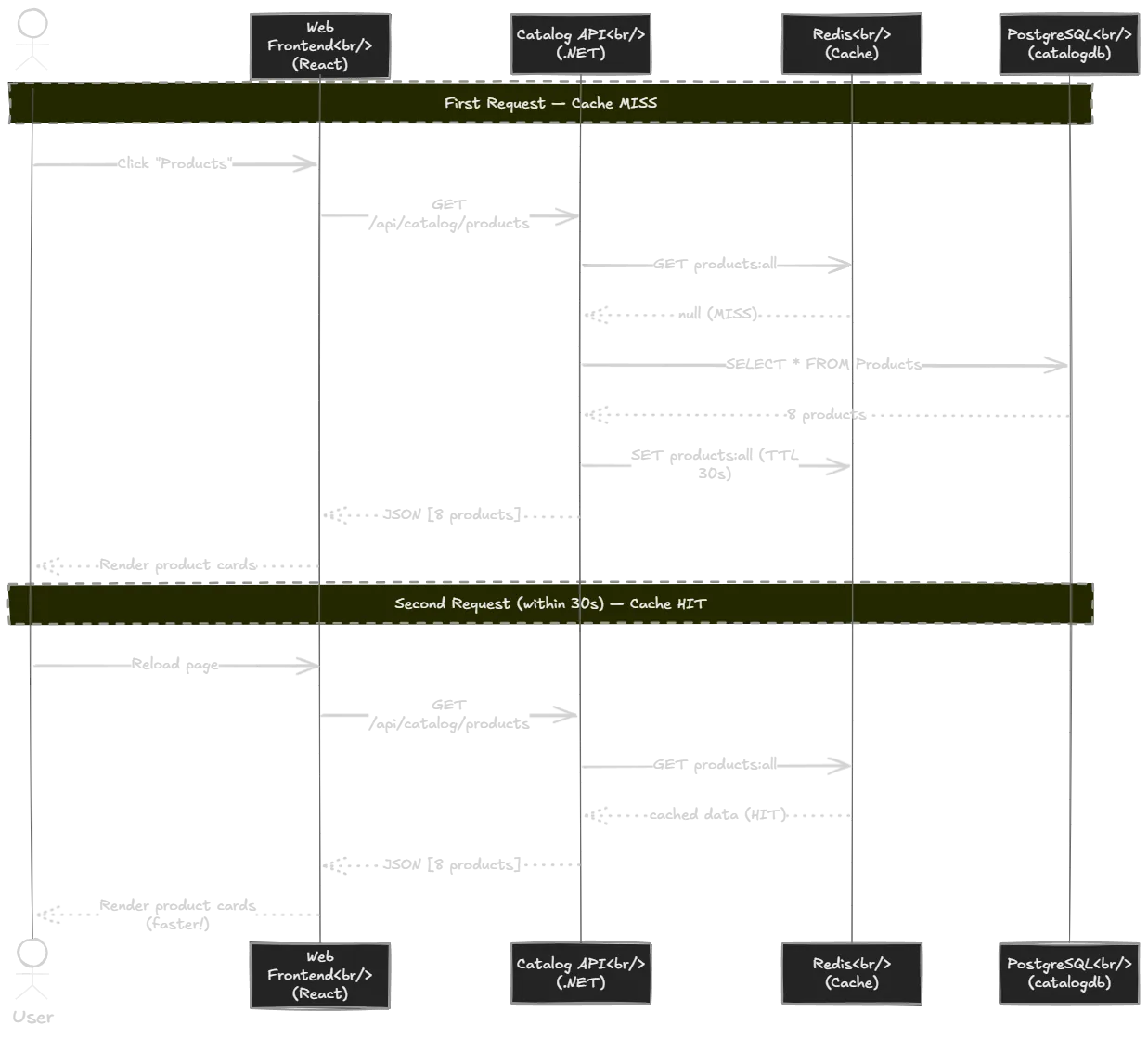
First request (cache MISS):
- React app calls
GET /api/catalog/products - Vite proxy forwards it to Catalog API
- Catalog API checks Redis → MISS (nothing cached yet)
- It queries PostgreSQL for all products
- Stores the result in Redis with a 30-second TTL
- Returns the products to the browser
Second request within 30 seconds (cache HIT):
- Same request hits the Catalog API
- Catalog API checks Redis → HIT
- Returns cached data immediately - no database query at all
- Response is noticeably faster
In the Aspire Dashboard you'll see the full trace: web → catalog-api → Redis (GET) → PostgreSQL (SELECT) → Redis (SET). On cache hit, the trace is shorter - it stops at Redis with no PostgreSQL step. You can see this difference visually, in real time.
Placing an Order and Watching Fulfillment
This is where the multi-language orchestration really shines.
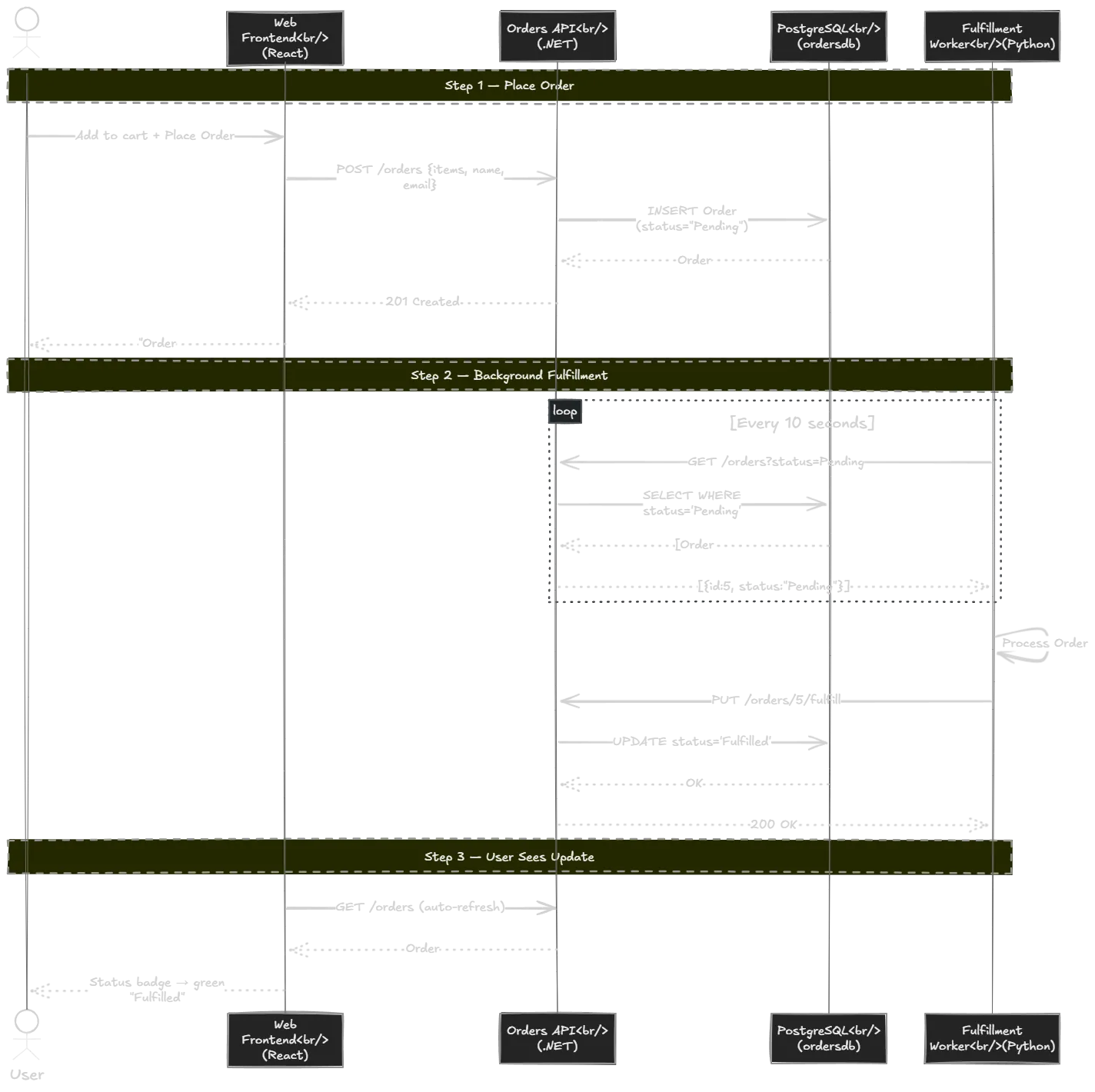
Step 1 - User places an order:
- React sends
POST /api/orders/orderswith cart items - Orders API validates the request and saves the order to PostgreSQL with status "Pending"
- User sees a success message
Step 2 - Python worker fulfills automatically:
- The Python fulfillment worker polls
GET /orders?status=Pendingevery 10 seconds - It finds the pending order, simulates processing (a 2-second delay)
- Calls
PUT /orders/{id}/fulfillon the Orders API - The order status changes to "Fulfilled"
Step 3 - User sees the update:
- The Orders page auto-refreshes and shows the green "Fulfilled" badge
The distributed trace in the Aspire Dashboard shows the complete flow from Python → .NET → PostgreSQL. Three languages, one trace view. You don't need to tab between terminals to figure out what happened - it's all correlated automatically.
Before vs. After Aspire
This is what convinced me. Let me be concrete about what changes.
| Concern | Without Aspire | With Aspire |
|---|---|---|
| Starting the system | 5+ terminals, manual order | dotnet run (one command) |
| Connection strings | Copy-paste into each config | Declared once, injected automatically |
| Service URLs | Hardcode localhost:PORT | Aspire injects via environment variables |
| Port conflicts | Debug manually | Aspire assigns ports automatically |
| Database creation | Manual SQL or scripts | AddDatabase() handles it |
| See all logs | Tab between terminals | Dashboard - unified, filterable |
| Distributed traces | Install Jaeger + configure | Built-in, zero config |
| Add a new service | Edit docker-compose, add env vars | One line in AppHost |
| Onboard new developer | Long README, multiple steps | dotnet run and you're done |
Every single row in this table is a real problem I've hit on real projects. The connection strings one alone has cost me hours of debugging across multiple teams.
Service Defaults - One Line for Observability
If you've ever set up OpenTelemetry manually, you know it takes work. You need to install NuGet packages, configure exporters, decide where to send data, set up a collector, run Jaeger or Zipkin...
With Aspire, each .NET service simply calls:
builder.AddServiceDefaults();
This single line configures:
- OpenTelemetry logging with structured messages
- Metrics (ASP.NET Core, HTTP client, runtime)
- Distributed tracing (ASP.NET Core, HTTP client)
- OTLP exporter pointed at the Aspire Dashboard
- Health check endpoints at
/healthand/alive
All of that is automatically pointed at the Aspire Dashboard. No separate collector. No Jaeger container. No Grafana stack.
For non-.NET services, Aspire is smart about it too. The Python worker in OrderCanvas gets OTEL_EXPORTER_OTLP_ENDPOINT injected automatically as an environment variable - no Python-side configuration needed. Aspire captures its structured stdout logs and shows them in the same dashboard alongside the .NET services.
The result: you get full observability (logs + traces + metrics + health) across all services without writing a single line of observability configuration beyond AddServiceDefaults().
Mixed-Language Orchestration Is Real
This is important: Aspire doesn't require your services to be .NET.
In OrderCanvas:
- Catalog API and Orders API are .NET
- Web Frontend is React + TypeScript
- Fulfillment Worker is Python
All three appear in the same dashboard. All get environment variables injected. All have health monitoring. All can reference each other with WithReference().
No Dockerfiles needed for local development. No manual port management. One graph, one dashboard, any language.
The Project Structure
OrderCanvas/├── src/│ ├── OrderCanvas.AppHost/ # THE orchestrator│ │ └── Program.cs # Defines the whole system│ ├── OrderCanvas.ServiceDefaults/ # Shared telemetry/health config│ ├── OrderCanvas.CatalogApi/ # Product catalog API (.NET)│ ├── OrderCanvas.OrdersApi/ # Order management API (.NET)│ ├── ordercanvas-web/ # React + Vite frontend│ └── ordercanvas-fulfillment/ # Python worker└── README.md
The AppHost's Program.cs is the single source of truth. Every resource, every dependency, every relationship is declared there. A new developer opens that file and immediately understands the entire system topology.
The Demo in Action
Let me show you what OrderCanvas actually looks like when you run it.
When you open the Web Frontend, you land on the Product Catalog page - a clean grid of products pulled from the Catalog API. Each product card shows the name, price, category, and an "Add to Cart" button.
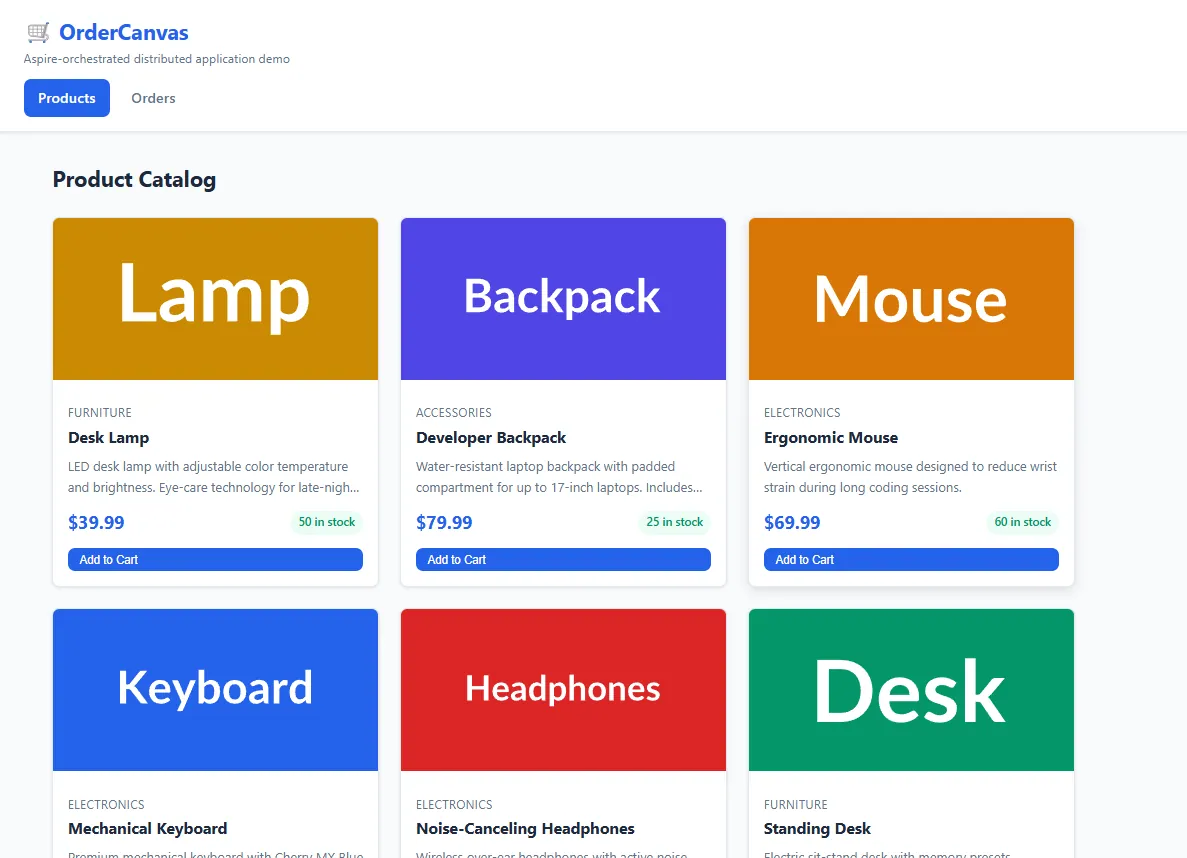
You add a few items to the cart, enter your name and email, and click "Place Order". The order is saved as "Pending" and within seconds the Python fulfillment worker picks it up, processes it, and marks it as "Fulfilled". You can watch this happen in real time on the Orders page - the status badge flips from purple "Pending" to green "Fulfilled" without you doing anything.
The key point: this entire flow involves 3 different languages and 4 different services (React → .NET Catalog API → .NET Orders API → Python Worker), all started from one command, all visible in one dashboard. That's the promise of Aspire - and OrderCanvas is the proof that it delivers.
Wrapping Up
Aspire solves a real problem that every distributed application developer faces: the pain of running, wiring, and observing multiple services locally.
Instead of Docker Compose + 5 terminals + hardcoded connection strings + manual observability setup, you get:
- One AppHost that defines the whole system
- One command to start everything
- Automatic wiring
- no more copying connection strings
- Built-in observability
- logs, traces, metrics, health checks
- Any language
- .NET, TypeScript, Python, all in the same dashboard
The OrderCanvas demo proves this with a real multi-language distributed app. Check it out, run dotnet run, and see for yourself.
That's all from me today.
P.S. Follow me on YouTube.